GUI Components - Aukio 3D
Table of Contents
1. Interactive widgets in 3D space
GuiComponent is the base class for interactive widgets that live
in the world, not in a 2D overlay: panels you can click, hover and
type into. It combines a composite shape (so it can hold any visual
content — text canvases, textures, other shapes) with two callback
interfaces: MouseInteractionController for the mouse and
KeyboardInputHandler for the keyboard.
Click a component and it takes keyboard focus, marked by a red wireframe border around it; press ESC or middle-click it and focus returns to camera navigation. While a component is focused, keyboard input goes to it instead of moving the camera.
GuiComponent widget = new GuiComponent(
    new Transform(new Point3D(0, 0, 300)),   // where in the world
    viewPanel,
    new Point3D(400, 300, 0));               // width, height, depth
widget.addShape(someContent);                // any shapes
viewPanel.getRootShapeCollection().addShape(widget);
2. Focus is single-level
KeyboardFocusStack owns exactly one focus owner at a time — despite
the name, there is no stack. pushFocusOwner replaces the current
owner (notifying the old one with focusLost and forgetting it);
popFocusOwner — triggered by ESC or a middle click — always falls
back to the default handler, WorldNavigationUserInputTracker
(WASD/arrow camera flight). It never restores a previously focused
widget.
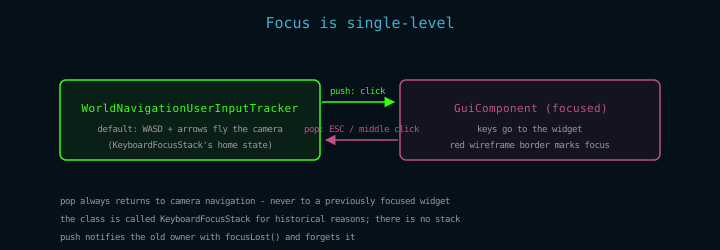
Figure 1: The two focus states and the transitions between them.
The default handler is what makes drag-look and wheel-move keep working even while a panel has focus: those live in the input manager, not in the focus owner. Only discrete key events and wheel routing change hands.
3. How events reach a component
Mouse hit detection piggybacks on rendering. During painting, every
tile notes which interactive shape (if any) lies under the cursor —
before its clipping is applied. When the pass is flushed, the first
non-null hit across tiles becomes the view's
currentObjectUnderMouseCursor, and
RenderingContext.handlePossibleComponentMouseEvent dispatches the
callbacks: mouseEntered / mouseExited on transitions,
mouseClicked on presses, mouseHover on moves.
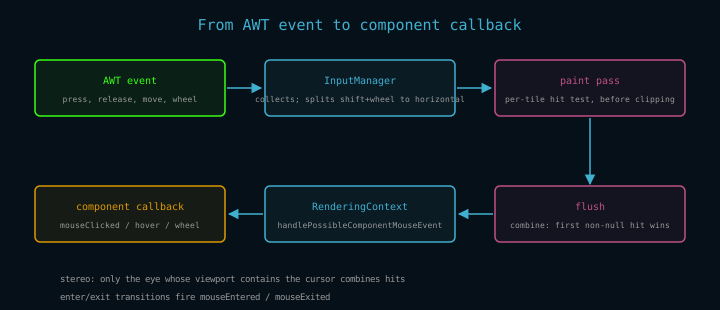
Figure 2: The dispatch path. The hit is found as a side effect of painting, combined at flush time, and delivered to the component.
In stereo mode the same object sits at a different screen X per eye, so hits are combined only for the pass whose viewport actually contains the cursor.
Clicks carry more than a button number: for textured shapes the
engine computes the perspective-correct texture coordinates of the
exact clicked point, in primary-texture pixels (NaN for untextured
shapes). That is what lets a component forward input into a captured
application window pixel-accurately — the aukio workspace's Firefox
and terminal panels are built on it.
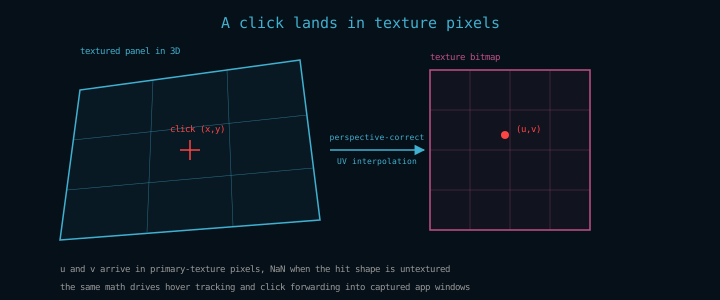
Figure 3: Screen point to texture pixel. Hover uses the same path.
4. The callback surface
MouseInteractionController (default methods shown delegate to the
simpler overloads, so override only what you need):
| Callback | When it fires | Notes |
|---|---|---|
mouseClicked(button) |
any click on the component | button: 1 left, 2 middle, 3 right |
mouseClicked(button, u, v) |
click on a textured component | u, v in texture pixels, NaN untextured |
mouseClicked(button, u, v, focusStack) |
as above, with the view's focus stack | override this one to take focus (see below) |
mouseHover(u, v) |
pointer moves over the component | throttled by the caller |
mouseWheelMoved(vUnits, hUnits) |
wheel while the component has focus | return false to fall through to camera movement |
mouseEntered / mouseExited |
cursor crosses the component boundary |
Every callback returns true when the view needs a repaint as a
consequence — the engine skips rendering otherwise.
Two dispatch rules to know:
- Components that take focus on click should override the 4-arg
mouseClickedand use the suppliedKeyboardFocusStack— never a storedViewPanelfield. Headless scenes (the golden-image harness) construct components with a null panel, and the field dereference would NPE inside the render thread. - The wheel routes to the focused component, and
GuiComponentconsumes it by default, so the camera stays put while you scroll inside a widget. Horizontal wheel input arrives from AWT as shift-modified vertical rotation and is split out by the input manager.
5. A complete example: the text editor
textEditorComponent/TextEditComponent is a full multi-line editor
built on GuiComponent — proof the interaction layer carries real
widgets. It renders through a TextCanvas
backed by a Page of TextLine=s, skinnable via =LookAndFeel, and
supports:
- cursor navigation (arrows, Home/End, Page Up/Down) and shift-selection
- clipboard: Ctrl+C / Ctrl+X / Ctrl+V, select-all with Ctrl+A
- word-level movement with Ctrl+Left / Ctrl+Right
- Tab indentation and Shift+Tab dedentation, single line or block
- automatic scrolling when the cursor leaves the visible area
(Tab reaches the widget at all because ViewPanel disables AWT
focus-traversal keys — otherwise the focus subsystem would eat it.)
The TextEditorDemo and TextEditorDemo2 demos in aukio-3d-demos
show the editor in a scene; both build deterministically for the
golden-image harness.