SpaceMouse 6DOF - Aukio 3D
Table of Contents
1. What the SpaceNavigator adds
Keyboard and mouse move the camera one axis at a time. A 3Dconnexion
6DOF mouse — a pressure-sensitive cap — moves it on all
six axes at once: push, pull, slide and press the cap to translate,
tilt and twist it to rotate. The engine supports it out of the box:
when a supported device is connected — a SpaceNavigator over USB or
a SpaceMouse Wireless over Bluetooth — ViewPanel
automatically starts a SpaceMouseManager that discovers the device
over hidraw (hot-plug works at runtime), and every application and
demo flies the camera with zero setup. Unplugging (or Bluetooth
disconnect) returns control to mouse and keyboard. Disable with
-De3d.spacemouse=false.
The package lives in eu.svjatoslav.aukio.e3d.gui.spacemouse.
2. How the cap maps to the camera
The cap is pressure-sensing, so translation is direct proportional
drive: cap deflection maps to camera velocity (full deflection =
TRANSLATION_SPEED_FACTOR — 3.0 — times the camera speed limit),
applied to the camera position every frame along the camera's own
orientation. There is deliberately no acceleration integrator like
the keyboard has: releasing the cap stops the camera instantly. Push
harder to fly faster, nudge to creep.
Rotation is split by axis: twist (yaw) is tuned twice as sensitive
as tilt (pitch) — constants ROTATION_YAW_DEGREES 3.0 vs
ROTATION_PITCH_DEGREES 1.5 in SpaceMouseController.
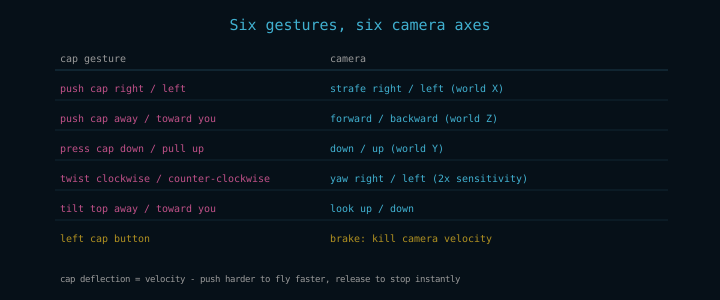
Figure 1: Every cap gesture and the camera motion it drives. Sign conventions were verified live against the device.
The left cap button is a brake: it zeroes the movement vector accumulated by keyboard and scroll-wheel input (the cap itself needs no brake — it stops when you let go).
3. Composing with other input
SpaceMouse, head tracking and mouse drag all write the same camera
and coexist without fighting. HeadLookController folds external
camera writes into its base orientation every frame, so a SpaceMouse
rotation or a mouse drag stays where you left it instead of being
overwritten by the next head-tracking update. All three can be used
interchangeably mid-motion.
4. Device access (udev rule)
Device access needs a udev rule that makes the device's hidraw node writable by the session user — without it the node is root-only and the cap is never discovered. The rule ships in the engine repository as udev/99-spacenavigator.rules:
# 3Dconnexion SpaceNavigator (USB)
SUBSYSTEM=="hidraw", ATTRS{idVendor}=="046d", ATTRS{idProduct}=="c626", MODE="0666"
# 3Dconnexion SpaceMouse Wireless (Bluetooth)
SUBSYSTEM=="hidraw", KERNELS=="0005:256F:C63A.*", MODE="0666"
The Bluetooth variant enumerates through /dev/uhid, so its parent
chain carries no idVendor attribute and udev does not import
HID_ID into the hidraw node either — the rule matches the parent
hid device's kernel name (0005:256F:C63A.*) instead.
Install it from the repository root and reconnect the device:
sudo install -m 644 udev/99-spacenavigator.rules /etc/udev/rules.d/
sudo udevadm control --reload
The device is silent at rest — it only sends reports while the cap is deflected — so there is no liveness watchdog; an unplug is noticed on the next failed read.
5. Wire protocols
Both models report the same six axes with the same sign conventions and ±350 full deflection, but the report layout differs:
| Model | Motion reports | Extra |
|---|---|---|
| SpaceNavigator (USB) | 7-byte reports: id 1 = translation, id 2 = rotation | — |
| SpaceMouse Wireless (BT) | one 13-byte report, id 1 = all six axes | id 0x17 = battery charge + charging flag |
Buttons arrive as report id 3 on both (bit0 = left, bit1 = right).
The Bluetooth battery level is exposed as
SpaceNavigatorHid.getBatteryPercent() / isCharging() (-1 when the
device has not reported it — wired models never do).