Stereoscopic Rendering - Aukio 3D
Table of Contents
1. What stereo rendering adds
A single rendered image is flat: the brain infers depth only from monocular cues (occlusion, shading, perspective, motion parallax while you move). Stereoscopic rendering adds the strongest depth cue of all — binocular disparity: your two eyes see slightly different images, and the visual cortex turns the difference into a direct sensation of depth.
Aukio 3D implements the simplest and most portable form: side-by-side stereo. Every frame renders the scene twice — once from the left eye position, once from the right — into the left and right halves of the same image. A VR headset, 3D TV, or a pair of XR glasses in side-by-side mode feeds each half to the corresponding eye, and the scene gains real volume.
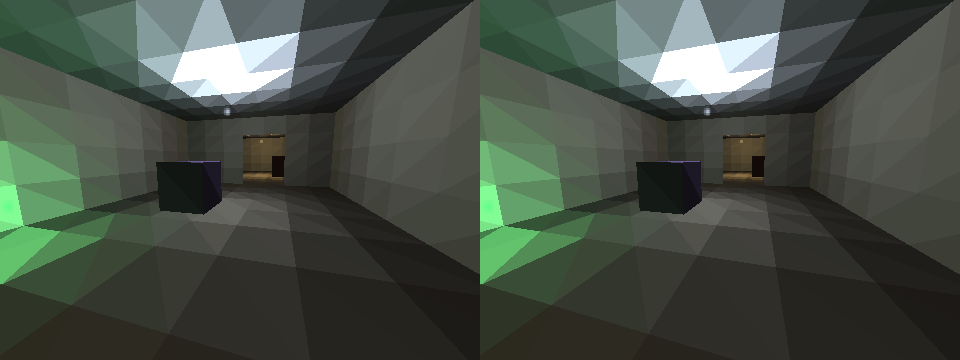
Figure 1: A side-by-side stereoscopic frame of the House demo, rendered headlessly with the Snapshot tool. Left half: left eye. Right half: right eye. Compare the dark cube and the doorway between the halves — the horizontal shift is the disparity your brain reads as depth.
2. The geometry: two parallel cameras
The two eye cameras are identical to the mono camera except for one
thing: the left eye's position is shifted by -IPD/2 and the right
eye's by +IPD/2 along the world X axis (the offset is applied to the
camera translation's x component directly, then restored). IPD
(inter-pupillary distance) defaults to 6.5 world units — the House
demo treats 1 unit as 1 cm, and 6.5 cm is the median human IPD.
Both cameras look in exactly the same direction (parallel cameras, no toe-in). Objects at different depths then land at different horizontal offsets between the two images — that offset is the disparity:
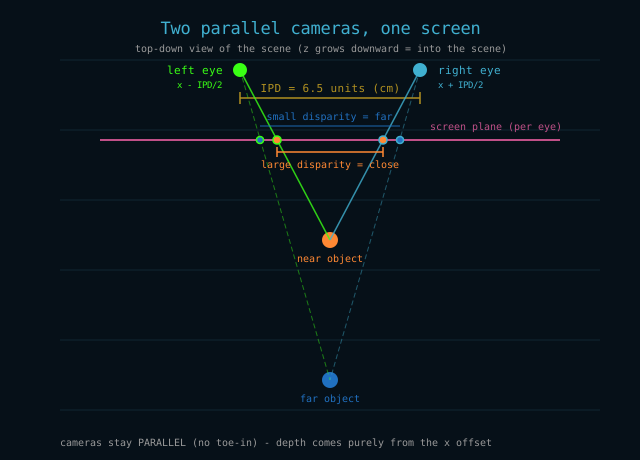
Figure 2: Top-down view: the two eye positions and how a near and a far object project onto the screen plane. The near object separates much more between the eyes than the far one.
- near object -> large disparity -> feels close,
- far object -> small disparity -> feels far,
- object at infinity -> zero disparity.
Larger IPD exaggerates disparity (stronger but potentially straining
depth); smaller IPD flattens the scene. +=/-= keys adjust it live in
0.5-unit steps while stereo is active.
3. One frame = two passes
Stereo does not add a second pipeline — it runs the existing
triple-buffered pipeline twice per frame. The render thread in
ViewPanel.renderFrame() executes two render passes back to back:
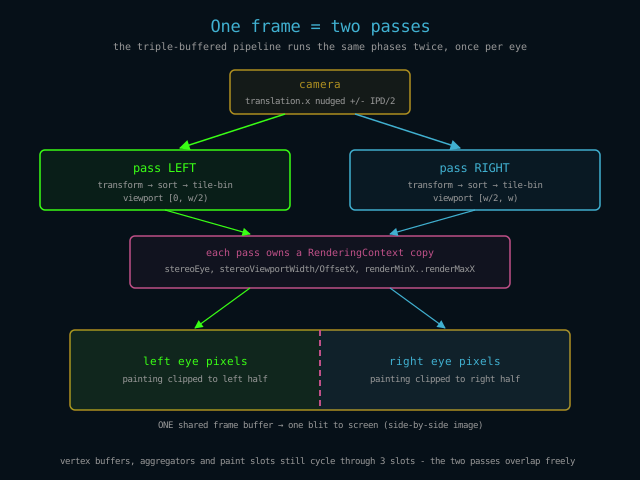
Figure 3: Per frame, the camera is nudged left, a full transform/sort/bin pass runs for the left viewport, then the camera is nudged right and a second pass runs for the right viewport. Both paint into one shared frame buffer, clipped to their half.
- Pass LEFT: camera translation.x is temporarily decreased by
IPD/2, the scene is transformed, depth-sorted and tile-binned into a
per-pass
RenderingContextcopy whose viewport is the left half of the frame ([0, width/2)), and the paint continuation is submitted to the worker pool. - Pass RIGHT: the same with +IPD/2 and the right viewport
(
[width/2, width)). The camera offset is always restored in afinallyblock, so the camera never drifts. - The two paints write into one shared frame buffer — each clipped to its half — and the completed side-by-side image is blitted to the screen in one go.
The triple-buffer machinery (3 vertex slots, 3 aggregator slots, 3
framebuffers) does not change: a pass takes the slot passCounter %
3, so left and right passes of the same frame simply occupy
consecutive slots and overlap exactly like consecutive mono frames do.
Workers flow from one pass's tiles straight into the next pass's tiles
with no idle gap.
4. What adapts per eye
The scene itself — geometry, textures, lightmaps, global illumination — is shared and identical for both eyes. Only the viewpoint moves, so only view-dependent stages differ per pass:
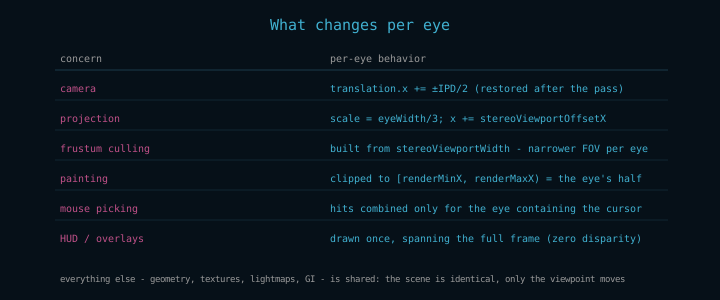
Figure 4: The per-eye surface area of the engine. Everything not listed here is eye-independent.
- Projection:
Vertexprojects withprojectionScale = eyeWidth/3(per-eye horizontal FOV) and addsstereoViewportOffsetXso the projected image lands in the correct half of the buffer. The same offset is applied for near-plane-clip vertices created directly in camera space. - Frustum culling: the frustum is rebuilt per pass from
stereoViewportWidth, so each eye culls against its own (narrower) view volume — nothing leaks in from the other eye's half. - Painting: every painter clips X to
[renderMinX, renderMaxX), which the pass set to its viewport. No eye can paint into the other half, even if a polygon crosses the center line. - Mouse picking: in stereo each eye shows the same object at a
different screen X, so a hit can only be resolved against one eye.
ViewPanelcombines mouse results only for the pass whose viewport actually contains the cursor. - HUD/overlays: developer tools, crosshair and text are drawn once over the finished frame, at zero disparity — they sit on the screen surface, not in the world.
5. Enabling stereo
ViewPanel viewPanel = ...;

// Side-by-side stereo on:
viewPanel.setStereoModeEnabled(true);

// Optional: match the viewer (default 6.5 world units):
viewPanel.setStereoIPD(6.5);
In the demos, SHIFT+F11 toggles stereo and fullscreen together (XR glasses want both); plain F11 remains fullscreen-only. With stereo active, + and - adjust the IPD in 0.5-unit steps (clamped at 0.5) so the viewer can tune comfort at runtime.
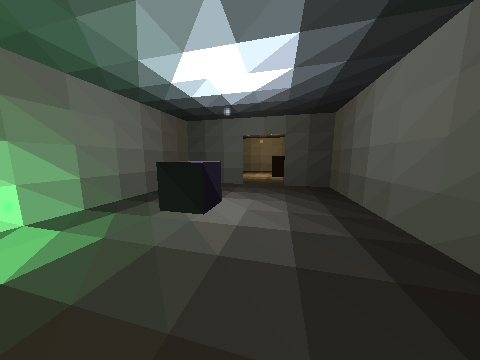
Figure 5: The same scene rendered as a normal mono frame (for comparison with the pair above). Notice there is no horizontal offset to read depth from — the picture is flat.
6. Head tracking: the glasses also drive the camera
Side-by-side stereo covers the display half of XR glasses. The
input half — turning the camera with your head — lives in the
engine too, in the eu.svjatoslav.aukio.e3d.gui.headtrack package,
so every application and demo gets it with zero setup. When a pair
of RayNeo XR glasses is plugged in over USB, ViewPanel
automatically starts a HeadTrackingManager that discovers the
device over hidraw: tracking begins within a couple of seconds of
plug-in (hot-plug works at runtime), and unplugging returns control
to mouse and keyboard. Disable with -De3d.headtrack=false.
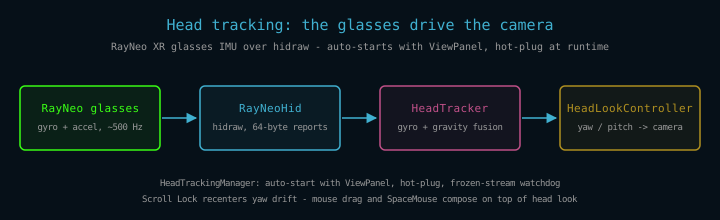
Figure 6: The head-tracking data path. The glasses stream IMU samples over hidraw; the tracker fuses them into yaw/pitch angles that the controller applies to the camera every frame.
HeadTracker fuses the glasses' IMU with a complementary filter:
gyroscope rates integrate into yaw/pitch angles (integration time
comes from the wall clock, never the device tick), while the
accelerometer's gravity vector slowly pulls pitch toward the true
horizon. Yaw has no absolute reference and drifts slowly — Scroll
Lock recenters at any time. Hold still for a second after plug-in:
gyro-bias calibration only samples while the head is stationary, so
turning during the first moment poisons it with phantom drift.
HeadLookController applies the fused angles to the camera every
frame (yaw gain 2.0, pitch gain 1.0; roll is deliberately not
applied), so the virtual world stays put while you look around.
Mouse drag composes on top — drag to look further than your neck
turns, and the view stays where the mouse left it; a SpaceNavigator
6DOF cap composes the same way.
Combined with stereo this is the full XR setup: SHIFT+F11 gives the glasses their side-by-side image, and the same glasses' IMU drives the camera. Note that the world-X IPD limitation listed below now applies to head motion: the eye offset is exact while facing along Z and degrades at large yaw angles.
Practical notes:
- Only one process may use the glasses at a time — concurrent consumers send conflicting IMU on/off commands and starve each other's streams.
- Head tracking is the engine's one sanctioned native dependency: it talks to hidraw through JNA.
- Device access needs the udev rule shown below — without it the glasses' hidraw node is root-only and tracking never starts.
The rule ships in the engine repository as udev/99-rayneo-glasses.rules:
ACTION=="add|change", SUBSYSTEM=="hidraw", SUBSYSTEMS=="usb", ATTRS{idVendor}=="1bbb", ATTRS{idProduct}=="af50", MODE="0666"
Install it from the repository root and replug the glasses:
sudo install -m 644 udev/99-rayneo-glasses.rules /etc/udev/rules.d/
sudo udevadm control --reload
| Class | Role in head tracking |
|---|---|
HeadTrackingManager |
auto-start with ViewPanel, hot-plug, stream watchdog |
RayNeoHid |
hidraw transport: enable sequence, 64-byte IMU reports |
HeadTracker |
IMU fusion, stationary-gated calibration, drift control |
HeadLookController |
applies fused yaw/pitch to the camera, folds mouse input |
7. Performance and limitations
- Stereo doubles the per-frame transform, sort and paint work — two full passes instead of one. The pipeline overlaps them the same way it overlaps consecutive mono frames, so throughput drops less than 2x on a multi-core machine, but expect a real cost.
- Each eye gets half the horizontal resolution of the panel. On a 1920x1080 fullscreen window each eye sees 960x1080 — pixels are shared, not duplicated.
- IPD is in world units: 6.5 only means "6.5 cm" if the scene is
modeled at 1 unit = 1 cm. In a scene with a different scale, divide
or multiply accordingly — or just tune with
+=/-= until the depth feels right. - The eye offset is applied along the world X axis, not the camera's right vector: it is exactly correct when the camera faces along Z (yaw = 0) and degrades as you turn — at yaw = 90° the eyes would be offset front-to-back instead of side-to-side. For a fixed-viewing- direction demo this is fine; a fully rotational stereo camera would need to apply the IPD along the rotated right vector.
- Side-by-side is a display format, not a headset driver: the engine produces the image; an XR viewer, 3D TV or video player is responsible for delivering the halves to the eyes.
- Global illumination is unaffected: lightmaps live on the surfaces, so both eyes sample the same converged lighting for free.