Algorithmic textures
Table of Contents
Back to BASIC applications collection
1. Circular waves
This QBasic program creates visually captivating circular wave patterns by manipulating pixel colors based on sine function calculations. It's a simple yet effective demonstration of how mathematical functions can be used to generate complex visual patterns.
The program uses two nested loops to iterate over each pixel on the screen. The outer loop handles the vertical axis (y-coordinate), and the inner loop handles the horizontal axis (x-coordinate).
For each pixel, the program calculates a sine value based on the squared distance from the origin (0,0). This calculation involves the formula:
colorvalue = SIN((x^2 + y^2) / 10) * 10
This program is a blend of mathematics and art, showcasing how simple algorithms can produce intricate and visually appealing results.
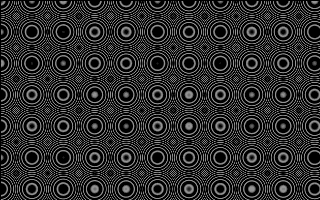
The screen is filled with a repeating grid of concentric rings, like ripples tiled across the surface. Each pixel's color comes from SIN((x^2 + y^2) / 10) * 10, clamped to the 0-15 range and shifted by 16 to reach into the upper palette. Because the squared distance grows quickly, the sine oscillates faster and faster away from the origin, and the discrete pixel grid aliases these rapid oscillations into the regular moire-like clusters of rings seen here.
' Program to render circular wave patterns.
' Algorithm was accidentally discovered while experimenting with sine function.
'
' This program is free software: released under Creative Commons Zero (CC0) license
' by Svjatoslav Agejenko.
' Email: svjatoslav@svjatoslav.eu
' Homepage: http://www.svjatoslav.eu
'
' Changelog:
' 2003, Initial version
' 2025, Improved program readability

SCREEN 13

' Initialize the screen mode to 320x200 with 16 colors

' Outer loop for the vertical axis (y-coordinate)
FOR ycoordinate = 1 TO 199
    ' Inner loop for the horizontal axis (x-coordinate)
    FOR xcoordinate = 1 TO 319
        ' Calculate the sine value based on the squared distances from the origin
        colorvalue = SIN((xcoordinate ^ 2 + ycoordinate ^ 2) / 10) * 10

        ' Clamp the color value to the range [0, 15]
        IF colorvalue < 0 THEN colorvalue = 0
        IF colorvalue > 15 THEN colorvalue = 15

        ' Set the pixel color at (xcoordinate, ycoordinate) with an offset to use the full 16-color palette
        PSET (xcoordinate, ycoordinate), colorvalue + 16
    NEXT xcoordinate
NEXT ycoordinate

' Wait for user key press
WHILE INKEY$ = "": WEND
CLS
END
2. Diamond square clouds
This QBasic program demonstrates the Diamond-Square algorithm, a method used to generate fractal terrain or cloud surfaces. The algorithm is particularly useful for creating realistic landscapes or textures in computer graphics.
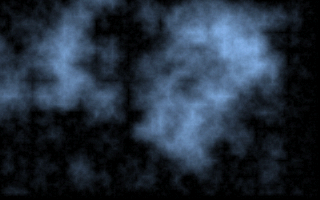
Soft bluish cloud blotches emerge from the black background, their bright misty cores fading into darkness. The palette is custom-programmed so that blue dominates while red and green are scaled down, giving the fractal its cold, smoky tone. The algorithm starts with a coarse 256-pixel grid and halves the scale on every pass: each midpoint and edge center receives the average of its neighbors plus a random displacement proportional to the current scale, clamped to a maximum lightness of 127, so large features appear first and finer detail layers on top.
DECLARE SUB DrawPixels (x1 AS INTEGER, y1 AS INTEGER, s AS INTEGER)
' Program to render cloud surface using diamond square algorithm.
'
' This program is free software: released under Creative Commons Zero (CC0) license
' by Svjatoslav Agejenko.
' Email: svjatoslav@svjatoslav.eu
' Homepage: http://www.svjatoslav.eu
'
' Changelog:
' 2003.12, Initial version
' 2024.08, Improved program readability

DECLARE SUB DrawBox (x1 AS INTEGER, y1 AS INTEGER, s AS INTEGER)
DECLARE SUB SetPalette ()
DECLARE SUB InitializeProgram ()
DEFINT A-Z
InitializeProgram

DIM SHARED maxLightness AS INTEGER
maxLightness = 127

DIM scale AS INTEGER
scale = 2 ^ 8

1 :
scale = scale \ 2
x1 = (319 \ scale) - 1
y1 = (199 \ scale) - 1

FOR y = 0 TO y1
    FOR x = 0 TO x1
        DrawPixels x * scale, y * scale, scale
    NEXT x
NEXT y

IF scale > 2 THEN GOTO 1
WAITa$ = INPUT$(1)

SUB DrawPixels (x1 AS INTEGER, y1 AS INTEGER, s AS INTEGER)
    ' Get the lightness values for the corners of the box
    c1 = POINT(x1, y1)
    c2 = POINT(x1 + s, y1)
    c3 = POINT(x1, y1 + s)
    c4 = POINT(x1 + s, y1 + s)

    ' Calculate the midpoint lightness values
    sp = s \ 2
    k = s * 2
    kp = k / 2

    cc2 = ((c1 + c2) / 2) + (RND * k) - kp
    IF cc2 > maxLightness THEN cc2 = maxLightness
    IF cc2 < 0 THEN cc2 = 0

    cc3 = ((c1 + c3) / 2) + (RND * k) - kp
    IF cc3 > maxLightness THEN cc3 = maxLightness
    IF cc3 < 0 THEN cc3 = 0

    cc4 = ((c2 + c4) / 2) + (RND * k) - kp
    IF cc4 > maxLightness THEN cc4 = maxLightness
    IF cc4 < 0 THEN cc4 = 0

    cc5 = ((c3 + c4) / 2) + (RND * k) - kp
    IF cc5 > maxLightness THEN cc5 = maxLightness
    IF cc5 < 0 THEN cc5 = 0

    ' Calculate the central lightness value
    cc1 = ((cc2 + cc3 + cc4 + cc5) / 4) + (RND * k) - kp
    IF cc1 > maxLightness THEN cc1 = maxLightness
    IF cc1 < 0 THEN cc1 = 0

    ' Set the calculated lightness values for the box
    PSET (x1 + sp, y1 + sp), cc1
    PSET (x1 + sp, y1), cc2
    PSET (x1, y1 + sp), cc3
    PSET (x1 + s, y1 + sp), cc4
    PSET (x1 + sp, y1 + s), cc5
END SUB

SUB InitializeProgram
    ' Set the screen mode and initialize the color palette
    SCREEN 13
    SetPalette
    RANDOMIZE TIMER
END SUB

SUB SetPalette
    ' Set the color palette for lightness levels
    FOR a = 0 TO 255
        OUT &H3C8, a
        OUT &H3C9, a / 4
        OUT &H3C9, a / 3
        OUT &H3C9, a / 2.3
    NEXT a
END SUB
3. Old paper
This QBasic program generates a procedural texture that simulates the appearance of old paper.
The program initializes the screen to a 320x200 resolution with 256 colors (SCREEN 13 in QBasic) and sets up a grayscale color palette. Each color index from 0 to 63 is assigned a shade of gray, creating a smooth gradient.
The program generates the texture by iterating over each pixel on the screen. For each pixel, it calculates a color value based on the color of the pixel directly above it, adding a small amount of random noise. This creates a smooth transition between pixels with controlled randomness, mimicking the fibrous texture of paper.
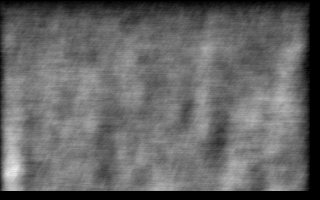
The surface reads as aged paper: a smooth gray gradient that darkens towards the bottom, with fibrous vertical streaks along the left side. A grayscale palette of 64 shades is programmed first. Every pixel then averages the pixel directly above it with the previously computed color, adds a small random jitter, and periodically subtracts a fresh random noise offset roughly every ten steps. This feedback loop keeps the tones continuous from row to row while the accumulated noise produces the rough, fibrous grain of worn paper.
' Program to render surface resembling old paper.
'
' This program is free software: released under Creative Commons Zero (CC0) license
' by Svjatoslav Agejenko.
' Email: svjatoslav@svjatoslav.eu
' Homepage: http://www.svjatoslav.eu
'
' Changelog:
' 2003, Initial version
' 2025, Improved program readability

DEFINT A-Z
SCREEN 13
RANDOMIZE TIMER

' Initialize the color palette to grayscale. Each color index from 0 to 63 has R, G, B values equal to the index,
' creating a smooth grayscale gradient for the 256-color mode.
FOR paletteIndex = 0 TO 63
    OUT &H3C8, paletteIndex
    OUT &H3C9, paletteIndex  ' Set red component
    OUT &H3C9, paletteIndex  ' Set green component
    OUT &H3C9, paletteIndex  ' Set blue component
NEXT paletteIndex

noiseOffset = 0

' Generate a paper-like surface by averaging the color of the pixel above with some randomness.
' This creates a procedural texture that mimics the roughness of paper.
FOR y = 1 TO 190
    FOR x = 1 TO 310
        stepCounter = stepCounter + 1

        ' Approximately every 10 steps, introduce a new random noise offset to create variation in the pattern.
        ' This prevents the surface from becoming too uniform.
        IF stepCounter > 10 THEN
            noiseOffset = RND * currentColor / 20
            stepCounter = stepCounter - (RND * 20 + 10)
        END IF

        ' Get the color of the pixel directly above the current position.
        topColor = POINT(x, y - 1)

        ' Calculate the current color as the average of the top color and the previous current color,
        ' plus a small random noise and minus the noise offset. This creates a smooth transition with
        ' controlled randomness.
        currentColor = (topColor + currentColor) \ 2 + ((RND * 2) - noiseOffset)

        ' Clamp the color value to stay within the valid palette range (0 to 63).
        IF currentColor < 0 THEN currentColor = 0
        IF currentColor > 63 THEN currentColor = 63

        ' Plot the current pixel at (x-1, y) using the calculated color.
        PSET (x - 1, y), currentColor
    NEXT x

    ' Set the starting color for the next row to the last calculated color of the current row.
    ' This ensures continuity between rows.
    PSET (0, y + 1), currentColor
NEXT y

' Wait for a single key press before exiting the program.
inputKey$ = INPUT$(1)

SYSTEM
4. Wood
This QBasic program creates a visually appealing simulation of a wood surface. It is designed to generate a realistic wood grain texture using simple graphical techniques.
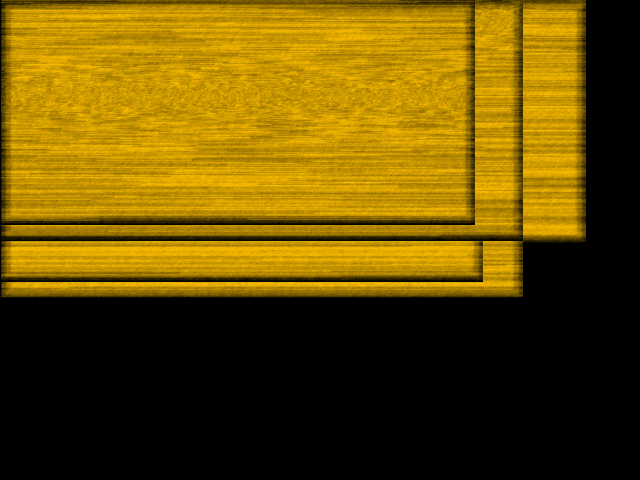
Overlapping wooden boards fill the screen, each showing wavy horizontal grain, vertical plank seams and bright beveled edges. A sixteen-color palette ramps from black to warm orange, with blue fixed at zero. Each board is framed by nested black, gray and white rectangles, then filled pixel by pixel: the new color is a weighted average of the pixels above and behind plus the previous result and a pinch of noise, while a sine-wave counter SIN((y + phaseOffset) / 100) bends the grain into waves. The main loop keeps drawing new boards at random positions forever.
' Program to render surface resembling wood.
'
' This program is free software: released under Creative Commons Zero (CC0) license
' by Svjatoslav Agejenko.
' Email: svjatoslav@svjatoslav.eu
' Homepage: http://www.svjatoslav.eu
'
' Changelog:
' 2003.12, Initial version
' 2024 - 2025, Improved program readability

DECLARE SUB DrawWoodSurface (woodX%, woodY%)
DECLARE SUB DrawPaper (xPos%, y1Pos%)
DEFINT A-Z
SCREEN 12
RANDOMIZE TIMER

' Set palette colors
FOR colorIndex = 0 TO 15
    OUT &H3C8, colorIndex
    OUT &H3C9, colorIndex * 4
    OUT &H3C9, colorIndex * 3
    OUT &H3C9, colorIndex * 0
NEXT colorIndex

' Main loop to draw wood at random positions
100:
woodX = RND * 400 + 200
woodY = RND * 100 + 200
CALL DrawWoodSurface(woodX, woodY)

SOUND 0, 10
GOTO 100

' Wait for user input to exit
exitKey$ = INPUT$(1)

SUB DrawWoodSurface (woodX, woodY)
    DIM lowerY AS INTEGER
    DIM phaseOffset AS INTEGER
    DIM xStepCounter AS INTEGER
    DIM randomOffset AS INTEGER
    DIM newColor AS INTEGER
    DIM upperColor AS INTEGER
    DIM currentColor AS INTEGER

    ' Draw the outline of the wood
    lowerY = woodY + 1
    LINE (0, 0)-(woodX, woodY), 0, BF  ' Black background
    LINE (5, 5)-(woodX - 5, lowerY - 5), 8, BF  ' Gray wood outline
    LINE (10, 10)-(woodX - 10, lowerY - 10), 15, BF  ' White inner highlight

    ' Initialize random phase offset for color variation
    phaseOffset = RND * 300

    ' Draw the wood texture
    FOR y = woodY - 1 TO 0 STEP -1
        FOR x = woodX - 1 TO 0 STEP -1
            xStepCounter = xStepCounter + 1
            IF xStepCounter > woodX THEN
                randomOffset = RND * 13  ' Small random noise for texture variation
                xStepCounter = SIN((y + phaseOffset) / 100) * woodX  ' Sine wave to create wavy grain pattern
            END IF
            upperColor = POINT(x, y + 1)  ' Get color from upper pixel
            currentColor = POINT(x, y)    ' Get color from current pixel
            newColor = (upperColor * 2 + currentColor + newColor * 3 + randomOffset) / 7 + RND * 1

            ' Ensure color value is within the valid range (0-15)
            IF newColor < 0 THEN newColor = 0
            IF newColor > 15 THEN newColor = 15

            ' Set the pixel color for the wood texture
            PSET (x + 1, y), newColor
        NEXT x
    NEXT y

END SUB
5. Yellow flame
"Yellow Flame" is a visually captivating program written in QBasic that generates a dynamic flame-like pattern on the screen.
Program initializes the color palette using sine waves to create a smooth gradient of colors. This gradient is essential for the flame effect.
The core of the program involves generating a surface pattern that mimics a flame. It does this by iterating over each pixel on the screen and calculating the average color of the surrounding pixels. A small amount of randomness is added to this average to create a natural, flickering effect.
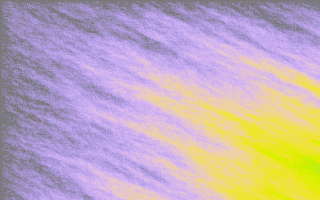
The texture glows like fire: bright yellow-white tongues at the bottom cool into orange and deep red swirls towards the top. The palette itself is built from three sine waves with different periods (21, 34 and 10 for red, green and blue), producing a smooth flame-like color gradient. Every pixel averages four already-drawn neighbors, the ones above, left, diagonally up-left and two to the left, and adds a random jitter between -2 and +2, so the heat appears to diffuse and flicker as it rises across the screen.
' Yellow flame.
'
' This program is free software: released under Creative Commons Zero (CC0) license
' by Svjatoslav Agejenko.
' Email: svjatoslav@svjatoslav.eu
' Homepage: http://www.svjatoslav.eu
'
' Changelog:
' 2003.12, Initial version
' 2024.08, Improved program readability


DEFINT A-Z ' Define all variables as integers
SCREEN 13 ' Set graphics mode to 320x200 with 256 colors
RANDOMIZE TIMER ' Seed the random number generator

' Initialize palette registers with sine wave colors
FOR paletteIndex = 0 TO 255
    OUT &H3C8, paletteIndex
    OUT &H3C9, INT(SIN(paletteIndex / 21) * 30 + 30)
    OUT &H3C9, INT(SIN(paletteIndex / 34) * 30 + 30)
    OUT &H3C9, INT(SIN(paletteIndex / 10) * 30 + 30)
NEXT paletteIndex

' Generate the surface pattern
FOR y = 1 TO 199
    FOR x = 1 TO 319
        prevPixel = POINT(x, y - 1)
        leftPixel = POINT(x - 1, y)
        diagPixel = POINT(x - 1, y - 1)
        left2Pixel = POINT(x - 2, y)

        ' Calculate the average of surrounding pixels and add some randomness
        newColor = (prevPixel + leftPixel + diagPixel + left2Pixel) \ 4 + (RND * 5 - 2)

        ' Clamp the color value within the valid range
        IF newColor < 0 THEN newColor = 0
        IF newColor > 63 THEN newColor = 63

        ' Set the pixel with the calculated color
        PSET (x, y), newColor
    NEXT x
NEXT y

' Wait for user input to exit
userInput$ = INPUT$(1)