Plotting
Table of Contents
Back to BASIC applications collection
1. 2D graph
The 2D Graph Plotter is a simple yet effective program written in QBasic that allows users to plot mathematical functions on a two-dimensional grid. This program is particularly useful for visualizing mathematical functions and understanding their graphical representations.
The main loop of the program calculates the y-value for each x-value based on a user-defined mathematical function.
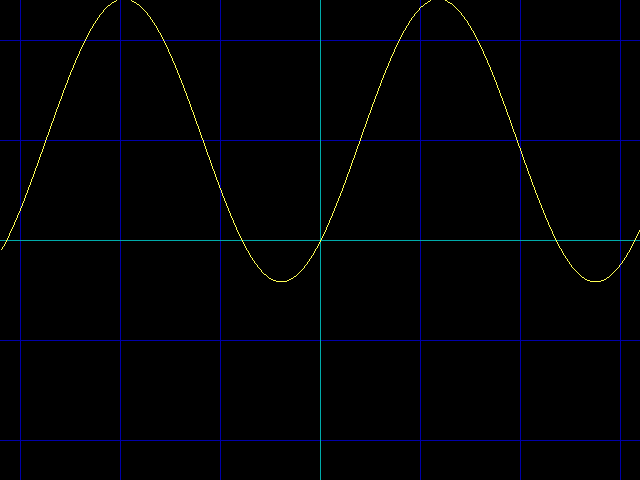
The function y = 1 - cos(2x) + sin(2x) plotted in yellow across the range x = -3.2 .. 3.2 at 100 pixels per unit. Dark blue grid lines mark every unit and the cyan axes cross at the origin. The curve oscillates around the line y = 1, dipping toward the x-axis wherever the sine and cosine terms momentarily cancel each other, and each segment is drawn only when both of its endpoints fall inside the screen.
2. 3D graph
The 3D Heightmap Explorer is a QBasic program designed to visualize mathematical functions in three dimensions. It allows users to explore various heightmaps by defining custom formulas and observing their graphical representations. This program is particularly useful for educational purposes, helping users understand complex mathematical surfaces.
Users can navigate through the 3D space using keyboard controls to move around and inspect the heightmap from different angles.
The core of the program is the formula subroutine, where users can define their mathematical functions. Multiple example formulas are provided, which can be enabled or disabled to create different visual effects.
The program includes a grid system that helps users perceive the scale and orientation of the 3D space. This includes background grids and a central 3D cross to indicate the zero point.
The formula subroutine evaluates the user-defined mathematical function to determine the height (Z-coordinate) of each point on the grid.
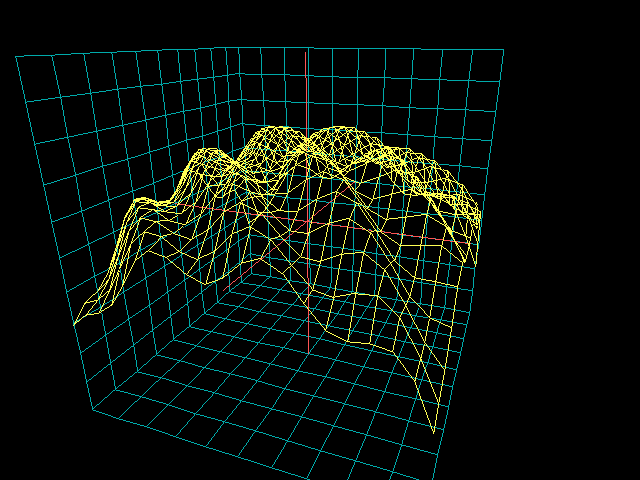
The heightmap as seen from the camera's starting position, floating outside the grid volume and looking in at an oblique angle. The yellow wireframe dome is the spherical cap SQR((15+v)*(15-v))-10, its surface rippled by the diagonal SIN(x+y) waves that are also enabled in the formula subroutine. Cyan measuring grids line the three axis planes behind and below the surface, and the light red 3D cross marks the zero point at the center of the scene.
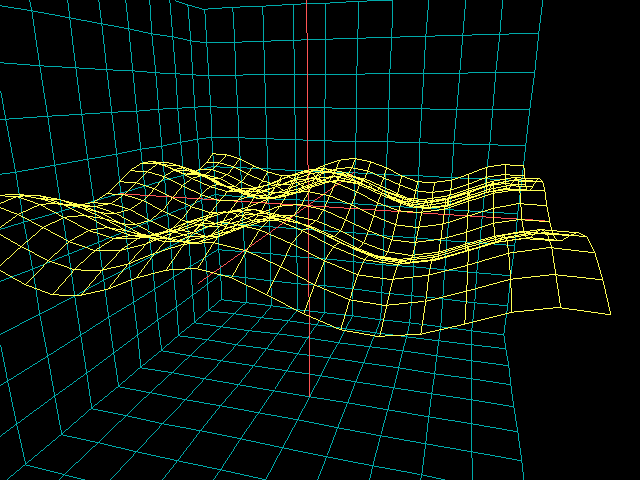
The same dome after flying the camera closer and lower with the cursor keys, so the cap's rim and the crests of the diagonal waves fill the frame. The wave term SIN(x+y)*SIN(tm/10) is modulated by the frame counter tm, so the ripples slowly grow and shrink as the program runs. Every frame the graaf subroutine re-evaluates the formula on the 21 by 21 point grid and reconnects neighboring points into the yellow mesh.
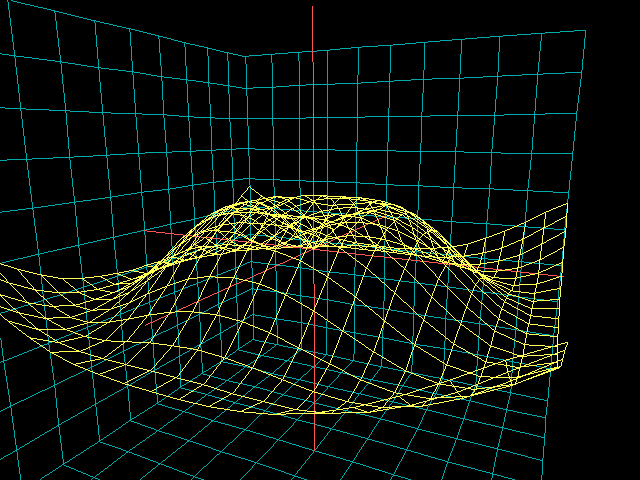
The yellow wireframe is the heightmap of the two formulas currently enabled in the "formula" subroutine: a spherical cap SQR((15+v)*(15-v))-10, where v is the distance from the center, plus diagonal waves SIN(x+y) that the frame counter slowly modulates over time. Cyan measuring grids along the three axis planes and the light red 3D cross mark the scale and the zero point. The camera is flown with the cursor keys, + and - climb and sink, 4/6/8/2 spin the view, and space halves all motion.
A flight through the scene in real time. The recording opens on the wide establishing view of the dome inside its three cyan grid planes, then the camera is steered around and finally right up against the surface, ending with a close-up of the rippling wireframe mesh from beneath. The cursor keys move the camera forward and sideways, + and - make it climb and sink, 4/6/8/2 spin the view, and space halves all motion for finer control. Meanwhile the diagonal waves pulse on their own as SIN(tm/10) modulates their amplitude, and each frame every line of the mesh is erased at its previous position and redrawn at the new one.
3. Deriviative calculator
This QBasic program is designed to compute and plot an arbitrary mathematical function on a 2D graph. Additionally, it calculates and plots the derivative of the function, providing a visual representation of both the function and its rate of change. The program is a great educational tool for those interested in understanding how mathematical functions and their derivatives can be visualized.
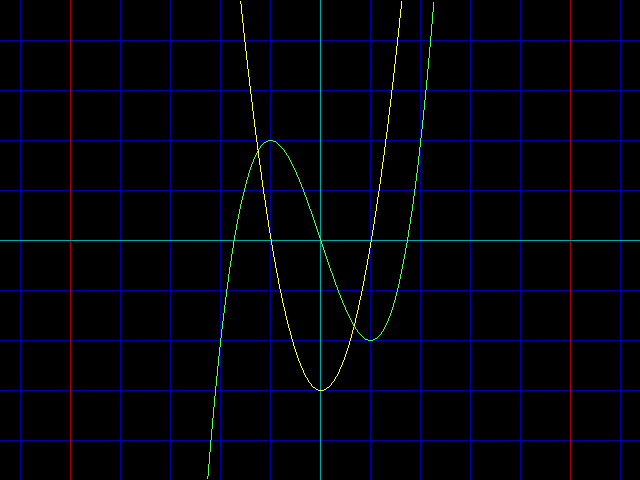
The light green curve plots f(x) = x^3 - 3x with its two turning points; the yellow curve beneath is the derivative, computed numerically as the per-step difference of the function and scaled back up by the scale factor, forming the parabola 3x^2 - 3 that crosses zero exactly under the function's extrema. Blue grid lines mark single units, red lines every fifth unit, and the cyan axes cross at the origin; the scale is 50 pixels per unit.
4. Sine and cosine table
The SIN & COS Table Generator is a QBasic program designed to visually plot the sine and cosine functions on a graphical screen. This program is particularly useful for educational purposes, providing a clear visual representation of these fundamental trigonometric functions.
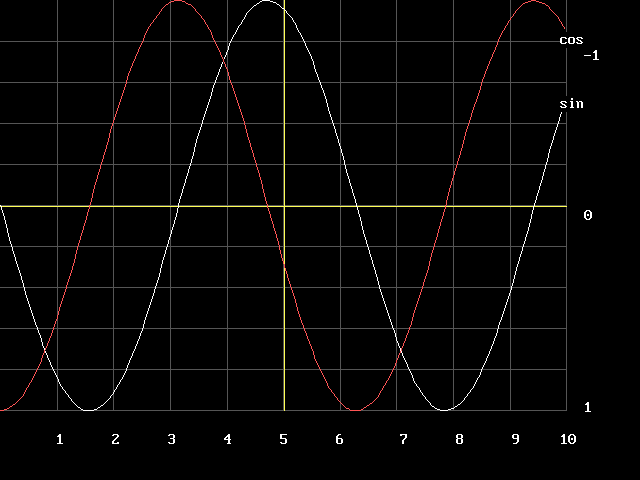
Sine (white) and cosine (light red) plotted together over 0 to 10 radians in steps of 0.05, each labeled "sin" and "cos" where its curve ends. Dark gray grid lines divide the screen into ten columns numbered 1-10 along the bottom edge, yellow lines mark the central axes, and the -1, 0 and 1 labels at the right give the vertical scale, so the plot doubles as a graphical lookup table for the two functions.