Perspective-Correct Textures - Sixth 3D
Table of Contents
1. The problem
When a textured polygon is rendered at an angle to the viewer, naive linear interpolation of texture coordinates produces visible distortion.
Consider a large textured floor extending toward the horizon. Without perspective correction, the texture appears to "swim" or distort because the texture coordinates are interpolated linearly across screen space, not accounting for depth.
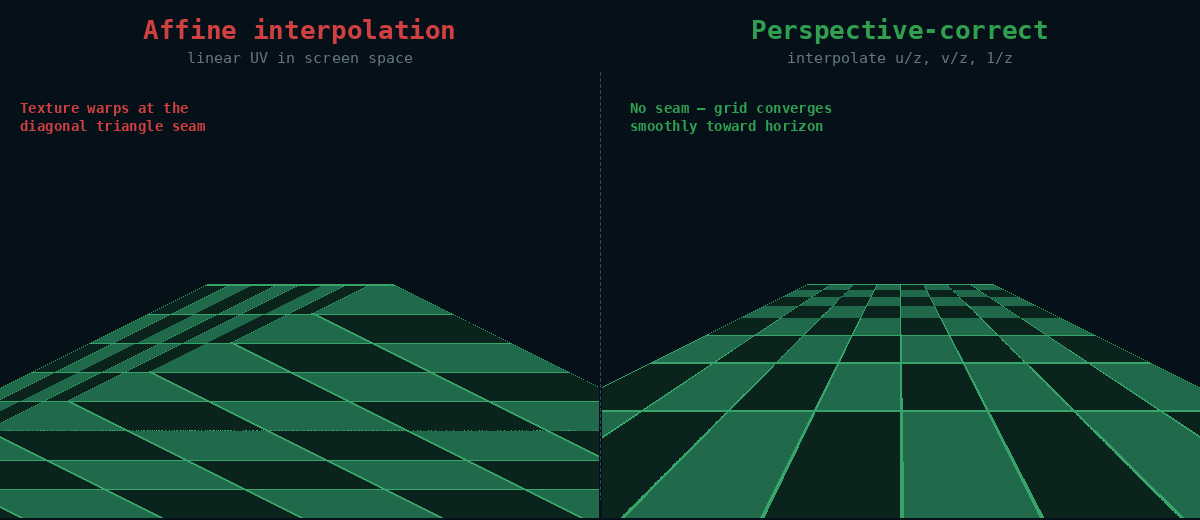
The Sixth 3D engine solves this with subdivided perspective correction inside the scanline rasterizer — the same technique Quake used.
2. How perspective correction works
Texture coordinates (u, v) are not linear in screen space, so they cannot simply be stepped per pixel. But divide them by depth and they become linear: (u/z, v/z, 1/z) all interpolate linearly across the triangle in screen space.
The rasterizer exploits this:
- Compute (u/z, v/z, 1/z) at each vertex
- Interpolate all three across the scanline with plain additions
- Every N pixels, recover the exact texture coordinate with one
division:
u = (u/z) / (1/z) - Between correction points, step u/v affinely toward the next exact point
The orange polyline hugs the exact green curve: within each 16-pixel block it is a straight line, but every block starts exactly on the curve. The dashed pink line is plain affine interpolation — visibly wrong everywhere except the endpoints.
Think of it like walking with a map that is slightly distorted: you walk in a straight line, but every 16 steps you check a landmark and correct your course. The correction (a division) costs something, so you do it every N pixels instead of every pixel — the divide cost is amortized to 1/16th of a per-pixel-correct rasterizer.
// Per scanline (simplified from drawHorizontalLinePerspective):
while (done < span) {
    // Advance (u/z, v/z, 1/z) to the end of this block
    su += dsu * block;  sv += dsv * block;  sw += dsw * block;
    double txNext = su / sw;   // one reciprocal = exact texture position
    double tyNext = sv / sw;

    // Step affinely through the block
    double txStep = (txNext - tx) / block;
    double tyStep = (tyNext - ty) / block;
    for (int i = 0; i < block; i++) {
        plot(x++, texture.sample(tx, ty));
        tx += txStep;  ty += tyStep;
    }
    done += block;
}
2.1. Adaptive correction interval
Quake used a fixed 16-pixel interval. This engine keeps 16 as the default but shrinks the interval when the error bound demands it.
The error of affine stepping within a block grows with both the texture gradient (texels per pixel) and the perspective curvature (how fast 1/z changes across the span). Each scanline computes
error(texels) ≈ texelRate · interval² · k / 2
where k = |d(1/z)| / min(1/z) is the per-pixel relative depth change,
and picks the largest power-of-two interval from the ladder 16, 8, 4,
2, 1 that keeps the bound under half a texel. Flat, gently angled
spans keep the fast 16-pixel cadence; a floor tile seen at a grazing
angle drops to shorter intervals exactly where the curvature is high.
2.2. When affine is good enough
For small or nearly flat triangles, plain affine mapping is already within half a texel of exact perspective, so the perspective setup is skipped entirely. The test compares the texture range the triangle covers against its depth variation:
affine is sufficient when texelSpan · (zMax/zMin − 1) < 2
Note the criterion is the texel span, not the pixel size — a tiny on-screen triangle can still map many texels into few pixels. Distant clusters of small triangles (a common case) all render through the cheaper affine path.
Triangles straddling the near plane (any vertex closer than z = 0.001) also fall back to affine, because 1/z interpolation is invalid there.
2.3. Toggling the correction
Perspective correction can be switched off globally for A/B comparison or debugging:
TexturedTriangle.setPerspectiveCorrectionEnabled(false); // plain affine everywhere
With correction disabled, large triangles at steep angles visibly warp — useful for demonstrating what the correction actually buys.
3. Mipmap selection
Perspective correction fixes where a texel is sampled; mipmapping decides which resolution to sample from. Each triangle estimates its screen-pixels-per-texel ratio from edge lengths:
scaleFactor = (sum of screen edge lengths) / (sum of UV edge lengths) · 1.2
Texture.getMipmapForScale() then picks the lazily-generated mipmap level closest to that scale: halved resolutions when the texture is minified, doubled when strongly magnified. Sampling a smaller mipmap under minification both speeds up rendering (better cache behavior) and reduces aliasing.