Rendering Loop - Sixth 3D
Table of Contents
1. Rendering loop
The rendering loop is the heart of the engine, continuously generating frames on a dedicated background thread. It orchestrates the entire rendering pipeline from 3D world space to pixels on screen.
1.1. What is a render loop?
A render loop is a continuous process that generates visual frames from 3D data. Think of it like a movie camera: each "frame" captures the current state of the 3D world and converts it into a 2D image that can be displayed on screen.
The process transforms shapes through multiple coordinate systems:
Each step has a specific purpose:
| Step | Input | Output | Purpose |
|---|---|---|---|
| Shapes | 3D vertices, meshes | Scene data | Objects waiting to be drawn |
| Transform | World coordinates | Screen coordinates | Convert 3D positions to where they appear on screen (see coordinate system); cull shapes outside the view frustum. Parallel: heavy subtrees fork onto the worker pool |
| Sort | Unordered shapes | Ordered by depth | Ensure correct visibility (far objects painted first). Parallel merge sort for large scenes |
| Bin | Sorted shapes | Per-tile shape lists | Each paint tile iterates only shapes that can touch it. Parallel over the worker pool |
| Paint | Per-tile shape lists | Pixels in buffer | Tiles split the screen into independent work units so clearing and rasterization run in parallel across CPU cores |
| Present | Pixel buffer | Screen image | Hand the completed frame to a dedicated thread that copies it to the display |
This pipeline runs repeatedly, targeting 60 frames per second by default. Even if nothing moves, the loop continues running—but the engine skips unnecessary work when the scene is static.
The steps above describe one frame logically, in the order data flows through it. In execution the engine is a software pipeline: transform of the next frame already runs while the previous frame is still being painted, and presentation happens on its own thread. See Software pipeline.
1.2. Main loop structure
The engine runs two dedicated daemon threads:
e3d-render— produces frames. It runs continuously:
while (renderThreadRunning) {
    ensureThatViewIsUpToDate();  // Produce one frame (or skip)
    maintainTargetFps();         // Sleep if ahead of schedule
}
e3d-present— presents frames. It takes completed frames from a mailbox and performs all display-path work (the multi-megabytedrawImage,BufferStrategy.show()and the X server round-trip), so the render thread never blocks on the display.
Both threads are daemons, so they stop automatically when the JVM exits. You can stop them explicitly with ViewPanel.stop().
1.3. Frame rate control
The engine supports two modes:
Target FPS mode: Set with setFrameRate(int). The engine tries to maintain the target rate by sleeping between frames.
- When rendering is slower than target: No sleeping occurs. The engine runs at maximum hardware speed. Missed frames are skipped, not rendered later — the timing simply resets to current time.
- When rendering is faster than target: The thread sleeps to limit FPS to the target rate, avoiding unnecessary CPU usage.
For example, with a 60 FPS target:
- If a complex scene takes 30ms per frame, you get ~33 FPS (hardware limit)
- If the scene later simplifies to 10ms per frame, you get exactly 60 FPS (throttled by sleeping)
- Unlimited mode: Set
setFrameRate(0)or negative. No sleeping — renders as fast as possible, and frames are produced even when the scene reports no changes, so the measured rate reflects maximum achievable throughput. Useful for benchmarking.
Production vs presentation. These are measured separately:
- Production rate (
getMeasuredFPS()) counts frames the pipeline completes per second. This is the benchmark number. - Presentation rate is how fast frames actually reach the screen. In
capped-FPS mode the present thread is paced to 60 blits per second
(override with
-Dsixth3d.presentRate=N); the cap exists because the X server also dispatches input, and flooding it with blits causes desktop-wide mouse/keyboard jitter. When production outruns presentation, stale frames are dropped from the mailbox instead of piling up latency. In unlimited (benchmark) mode presentation pacing is disabled entirely, so it cannot throttle production.
2. Software pipeline
The phases below are described per frame, but consecutive frames overlap. The engine triple-buffers everything a frame writes:
- 3 framebuffers (each with its own
RenderingContext) - 3 projection buffer slots (per-vertex screen state)
- 3 render aggregators (transform output, sort/bin state)
A render pass P (one per frame, or one per eye in stereo) transforms into slot P mod 3, so it only conflicts with the paint of pass P-3. Before each transform the render thread flushes completed paint passes (mouse hits, frame deposit) and blocks only if paint P-3 is still running — which steady-state worker throughput prevents. Workers finishing one pass's tiles flow straight into the next pass's queued tiles with no idle gap.
Completed frames go to a presentation mailbox that keeps only the newest frame: if the display path is slower than production, stale frames are dropped (and their buffers released) instead of accumulating latency — swapchain "mailbox mode".
A per-buffer present gate guarantees painting frame F+3 never overwrites a buffer the present thread is still blitting frame F from.
The goal of all this overlap is throughput: keep every CPU core busy, all the time. No phase waits for another phase of the same frame when it could already be working on the next one. The Developer Tools thread-activity timeline shows it working — all 18 worker rows packed solid with paint, bin and sort tasks from up to three frames at once, while the render thread (top row) and present thread tick along above them:
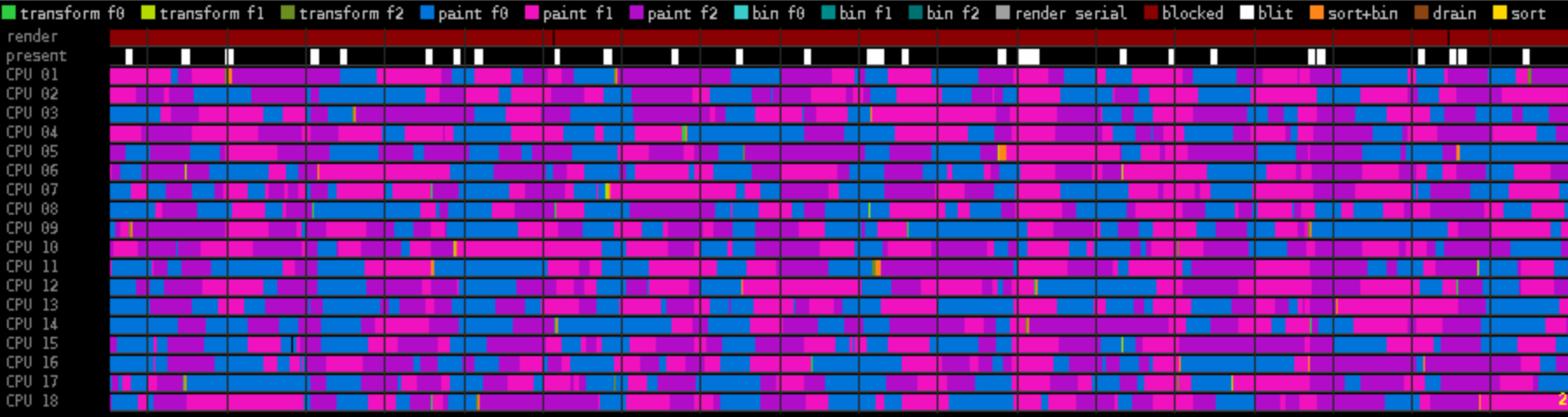
The pipeline can be disabled with -Dsixth3d.pipeline=false, restoring
strictly sequential phase order (each paint pass is awaited
immediately). This is a kill switch for benchmarking and regression
hunting.
3. Rendering phases
Each frame goes through 6 phases. Phases 2–4 run inside an asynchronous continuation on the shared worker pool, and phases of consecutive frames overlap as described in Software pipeline.
3.1. Phase 1: Transform shapes
All shapes are transformed from world space to screen space:
- Build camera-relative transform (inverse of camera position/rotation)
- Update the view frustum from camera state and viewport dimensions
- Walk the scene tree:
- Cull composite shapes whose bounding box misses the frustum
- Apply camera transform
- Project 3D → 2D (perspective projection)
- Calculate depth for sorting
- Queue for rendering
What is coordinate transformation?
Every shape exists in "world space" — its own position in the 3D world. To render it, we must convert to "screen space" — where it appears on your monitor. This involves:
- Translation: Move coordinates relative to camera position
- Rotation: Rotate coordinates based on camera orientation
- Projection: Convert 3D (x, y, z) to 2D (x, y) screen pixels
Objects further away appear smaller (perspective). The coordinate system uses Y-down to match screen conventions, making projection straightforward.
The transform is parallel and non-blocking: composites with enough children fork their render lists into chunk tasks on the shared worker pool (at any nesting level), and the render thread returns without waiting. The chunk tasks are drained and merged on a worker thread inside the paint continuation, while the render thread is already walking the next pass.
Frustum culling happens here: composites test their bounding box against the frustum and skip invisible subtrees entirely, saving both transform and paint work. Per-frame culling statistics are collected for the developer tools panel.
3.2. Phase 2: Sort shapes by depth
Shapes are sorted by depth in descending order (farthest first), with the shape id as a deterministic tiebreaker:
// ShapesZIndexComparator: descending Z, ties broken by shape id
if (z1 < z2) return 1;        // z1 is nearer -> sort after z2
else if (z1 > z2) return -1;  // z1 is farther -> sort before z2
return Integer.compare(o1.shapeId, o2.shapeId);
Above 8192 queued shapes the sort runs as an instrumented parallel merge sort on the shared worker pool; below that it is single-threaded.
Why sort back-to-front?
This implements the painter's algorithm — like painting a landscape: first paint the sky (farthest), then mountains, then trees, then the foreground. Each layer covers what's behind it.
Without sorting, nearby objects might be painted first and then covered by distant ones, causing visual errors. This is especially important for transparent objects — you need to see through the near ones to what's behind.
The Z value represents distance from the camera after transformation. Larger values = further away. The id tiebreaker keeps the order deterministic frame-to-frame, which tiled rendering relies on: every tile paints its shapes in the same global (Z, id) order.
3.3. Phase 3: Bin shapes into tiles
The sorted queue is binned per paint tile by screen-space overlap: each tile's bin lists only the shapes whose vertex bounds (plus a paint margin) can touch that tile. A shape overlapping several tiles is added to each of their bins.
This means a paint thread iterates a short local list instead of the whole scene, and it is what makes the tile grid scale: refining the grid shrinks each bin instead of just subdividing the clearing work.
Binning is parallelized over the shared worker pool.
3.4. Phase 4: Clear and paint tiles (multi-threaded)
The viewport is divided into a grid of rectangular tiles — roughly 10 tiles per render thread, split into near-squares (square tiles minimize boundary crossings, i.e. how many tiles each shape overlaps). These are not horizontal bands: each tile has both X and Y bounds.
Painting is work-stolen, not pre-assigned. All tile tasks go onto a
shared ForkJoinPool (sized to 75% of CPU threads by default, at most
cores − 1, so one thread stays free for the rest of the system;
changeable at runtime via setNumRenderThreads(int)). A worker that
finishes a cheap tile immediately pulls the next queued task — another
tile (of this or an adjacent frame's pass), a transform chunk, a sort
piece — so cores never idle behind a busy thread.
Each tile task:
- Clear tile: fill its rectangle with background color
- Paint shapes: rasterize the tile's bin, back-to-front, clipping at tile bounds
Both operations happen within the same task, so clearing always completes before painting on that tile. Parallel clearing across disjoint tiles maximizes memory bandwidth utilization.
Each tile renders through a SegmentRenderingContext — a view of the
frame context carrying the tile's X/Y bounds and a Graphics2D
pre-clipped to the tile rectangle for thread-safe text and
anti-aliased drawing. (The class name predates the tile grid; a
"segment" is now a tile.) Mouse hit detection happens during painting,
before clipping.
A CountDownLatch tracks completion of all the pass's tiles — but the
render thread does not wait for it here. The latch is awaited one
pass later, during the flush (see Phase 5).
3.5. Phase 5: Flush completed passes
Before each new transform, the render thread flushes paint passes that have completed. For each flushed pass:
- Await its tile latch (blocks only when correctness demands it — transform of pass P may not start before paint of pass P-3 finished)
- Combine mouse results: during painting, each tile tracked which shape is under the mouse cursor. Since all tiles paint the same back-to-front order, they should all report the same hit; the first non-null result wins:
for (SegmentRenderingContext ctx : segmentContexts) {
    if (ctx.getSegmentMouseHit() != null) {
        context.setCurrentObjectUnderMouseCursor(ctx.getSegmentMouseHit());
        return;
    }
}
In stereo mode this only runs for the eye whose viewport actually contains the cursor — each eye sees a different camera position, so combining for the wrong eye would overwrite a valid hit with null.
- If this pass completed a frame, deposit the frame into the presentation mailbox (see Software pipeline). The render thread never blocks on the display.
Passes that finished painting are flushed without any blocking, so completed frames reach the mailbox as early as possible.
3.6. Phase 6: Present frame
The e3d-present thread takes the newest mailbox frame (dropping any
unshown older frame) and copies its BufferedImage to the screen using
BufferStrategy for tear-free page-flipping:
do {
    Graphics2D g = bufferStrategy.getDrawGraphics();
    g.drawImage(context.bufferedImage, 0, 0, null);
    g.dispose();
} while (bufferStrategy.contentsRestored());

// framebuffer released for reuse here
bufferStrategy.show();
Toolkit.getDefaultToolkit().sync();
The frame's buffer is released for reuse right after the drawImage
loop — show() and sync() touch only the BufferStrategy's own back
buffer and the X connection, and at high resolutions they cost more
than the draw itself, so the next frame's painters don't wait for them.
What is double-buffering?
Without double-buffering, the screen updates while pixels are being written. This causes screen tearing — visible horizontal splits where the top of the frame shows old content while the bottom shows new.
Double-buffering uses two pixel buffers:
- Back buffer: Where rendering happens (offscreen, invisible)
- Front buffer: What's currently displayed on screen
When rendering completes, the buffers swap in one atomic operation. The viewer always sees complete frames, never partial updates.
The do-while loop handles the case where the OS recreates the back
buffer (common during window resizing). Since our offscreen
BufferedImage still has the correct pixels, we only need to re-blit,
not re-render.
4. Frame listeners and smart repaint skipping
A FrameListener is a callback that runs custom logic before each potential frame. Think of it as your "per-frame hook" — the engine calls all registered listeners, giving them a chance to update animations, physics, or game logic.
4.1. Registering a frame listener
Use addFrameListener() to register your callback:
// This is how you register a frame listener
viewPanel.addFrameListener((panel, deltaMs) -> {
    // Example: simple animation listener
    double rotationSpeed = 1.0;  // radians per second
    shape.rotate(rotationSpeed * deltaMs / 1000.0);  // Framerate-independent rotation
    return true;  // Request repaint (shape moved)
});
The listener receives two parameters:
panel: The ViewPanel that's renderingdeltaMs: Milliseconds since last frame (for framerate-independent animation)
The return value controls whether the frame gets rendered:
true: "Something changed — repaint the screen"false: "Nothing changed — can skip this frame"
4.2. Frame skipping optimization
The engine avoids unnecessary rendering. A frame is skipped when:
- All listeners return false (nothing changed in your scene)
- Camera did not move (built-in Camera listener returns false once the camera comes to rest)
- No resize or repaint requests
This means a static scene with no animations consumes almost zero CPU. The render thread keeps running (checking for changes), but actual pixel rendering is skipped entirely. Skipped frames still flush any pending paint passes from earlier frames, so in-flight frames always reach the screen.
Two exceptions force a frame regardless of listeners:
- Unlimited (benchmark) mode (
targetFPS <0=) renders continuously, so the measured rate reflects maximum throughput - An explicit repaint request (resize, stereo toggle,
repaintDuringNextViewUpdate(), etc.)
// Example: listener that only requests repaint when needed
viewPanel.addFrameListener((panel, deltaMs) -> {
    if (gameState.hasUpdates()) {
        gameState.processUpdates();
        return true;   // Only repaint when game state actually changed
    }
    return false;      // Skip frame — nothing to update
});
4.3. Built-in listeners
The engine registers these listeners by default:
- Camera — applies movement velocity and friction each frame, and returns true when the camera actually moved (more than a small threshold), i.e. while the user is actively navigating
- InputManager — processes mouse/keyboard events
When the camera stops moving and you release all keys, the Camera listener returns false. If your custom listeners also return false, the frame is skipped until something changes.
5. Rendering context
The RenderingContext holds all state for rendering into one framebuffer: the pixel buffer, projection parameters, and per-frame bookkeeping.
| Field | Purpose |
|---|---|
pixels[] |
Raw pixel buffer (int[] in RGB format) |
bufferedImage |
Java2D wrapper around pixels |
graphics |
Graphics2D for text, lines, shapes |
width, height |
Full framebuffer dimensions |
centerCoordinate |
Screen center of the active viewport (for projection) |
projectionScale |
Perspective scale factor, derived from viewport width. Mutable: each stereo eye sets its own |
renderMinX, renderMaxX |
X bounds of the active viewport or tile |
renderMinY, renderMaxY |
Y bounds (full height on the frame context, tile bounds on segment views) |
stereoEye, stereoViewportWidth, stereoViewportOffsetX |
Which eye this pass renders and where its viewport sits in the buffer |
tilesX, tilesY, viewportCount, numRenderSegments |
Tile grid geometry (segments = tilesX × tilesY × viewports) |
frustum |
View frustum for culling, rebuilt each pass from camera state |
frameNumber |
Per-context frame counter |
transformCycleId |
Globally unique transform-cycle id, safe key for per-cycle memoization |
vertexSlot |
Projection buffer slot (0–2) this pass transforms into |
5.1. Triple-buffered frame contexts
The engine keeps three frame contexts, cycled by frame parity. While frame N is still being painted from one buffer, frame N+1 already transforms into the next — paint threads never idle waiting for the transform phase, and vice versa. A per-buffer present gate prevents painting frame F+3 into a buffer the present thread is still blitting frame F from.
All three contexts are recreated together when the window is resized,
when the tile grid changes (render thread count), or when stereo mode
is toggled. Otherwise they are reused — prepareForNewFrameRendering()
just resets per-frame state like mouse tracking.
5.2. Per-pass copies
Each render pass (one per eye in stereo) works on a private copy of the frame context. The copy shares the pixel buffer, graphics and services, but owns the projection fields (center, scale, viewport, vertex slot), so the next pass's setup cannot disturb a pass whose transform or paint is still in flight.
Consequence for engine code: per-frame mutable state must be allocated eagerly on the frame context. Anything created lazily inside a pass lands on the throwaway copy and is lost.
5.3. Tile segment views
Each paint tile gets a SegmentRenderingContext,
a view that shares the framebuffer with its parent but carries its own
X/Y tile bounds and a pre-clipped Graphics2D for thread-safe text and
shape drawing. Mouse hits are tracked per tile and combined after all
tiles finish painting.