Perspective-Correct Textures - Sixth 3D
Table of Contents
1. The problem
When a textured polygon is rendered at an angle to the viewer, naive linear interpolation of texture coordinates produces visible distortion.
Consider a large textured floor extending toward the horizon. Without perspective correction, the texture appears to "swim" or distort because the texture coordinates are interpolated linearly across screen space, not accounting for depth.
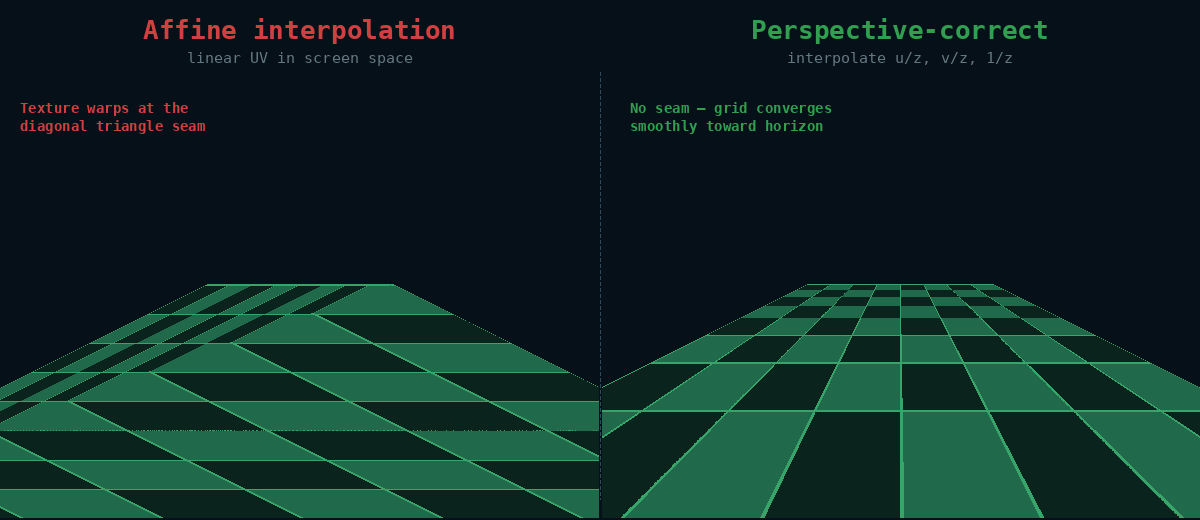
The Sixth 3D engine solves this through adaptive polygon tessellation. Instead of computing true perspective-correct interpolation per pixel (which is expensive), the engine subdivides large triangles into smaller pieces. Each sub-triangle is rendered with simple affine interpolation, but because the pieces are small, the error is negligible.
2. How Tessellation Works
The engine uses screen-space adaptive tessellation via ScreenSpaceTessellator:
void tessellate(TexturedTriangle polygon) {
    // Find the longest edge in screen-space pixels
    ScreenSpaceEdge longest = findLongestScreenEdge(polygon);

    if (longest.screenLength <= maxScreenPixels) {
        // Small enough on screen: add to result
        result.add(polygon);
    } else {
        // Split at midpoint (interpolate world, texture, screen coords)
        Vertex middle = longest.interpolateMidpoint();
        // Recurse on two sub-triangles
        tessellate(subTriangle1);
        tessellate(subTriangle2);
    }
}
The midpoint is computed by averaging both 3D coordinates, texture coordinates, and screen coordinates. This ensures each sub-triangle has correct depth sorting.
2.1. Adaptive Threshold
The tessellation threshold is adaptive - it adjusts dynamically based on polygon budget:
- AdaptiveTessellationController tracks polygon count per frame
- If count exceeds ~1000 polygons, threshold increases (less tessellation)
- If count is low and threshold above minimum, threshold decreases (better quality)
- Threshold range: 30-500 pixels
2.2. Safeguards Against Excessive Tessellation
When the camera is very close to a polygon, screen-space coordinates can become extremely large (100,000+ pixels). Without safeguards, this would produce millions of triangles. The tessellator includes three limits:
- Maximum recursion depth (8 levels = max 256 triangles per polygon)
- Maximum triangles per polygon (hard limit of 200)
- Maximum edge length for tessellation (10,000 pixels - skip tessellation for huge polygons)
3. Visualizing the Tessellation
Press F12 to open Developer tools and enable "Show polygon borders". This draws yellow outlines around all textured polygons, making the tessellation visible:
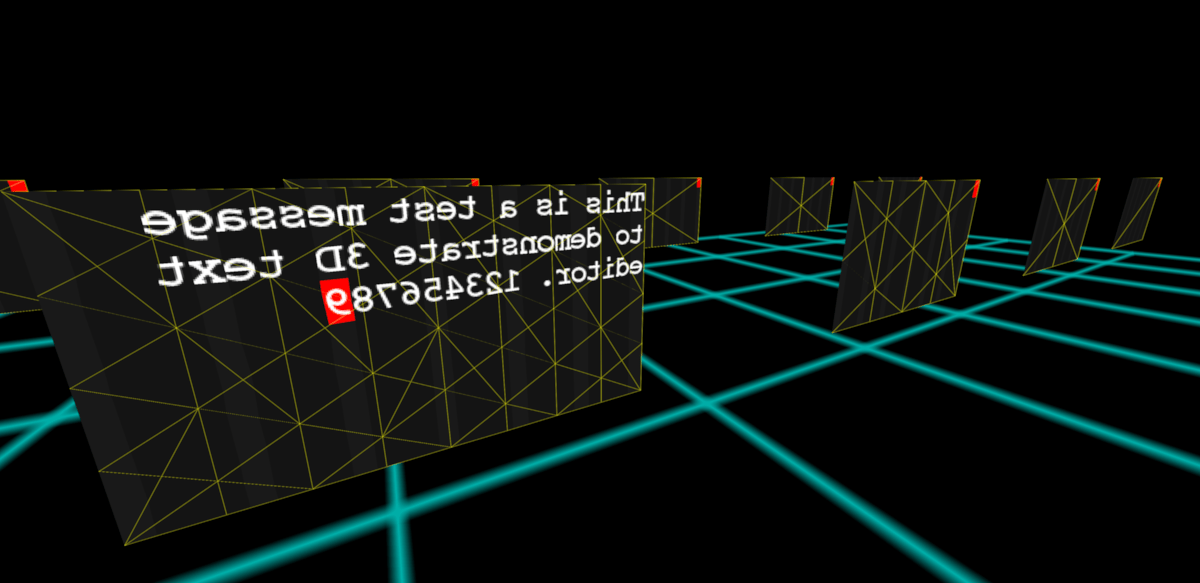
This visualization helps you:
- Verify tessellation is working correctly
- See how subdivision density varies with camera distance to the polygon
- Debug texture distortion issues