JavaInspect - Utility to visualize java software
Table of Contents
1. Introduction
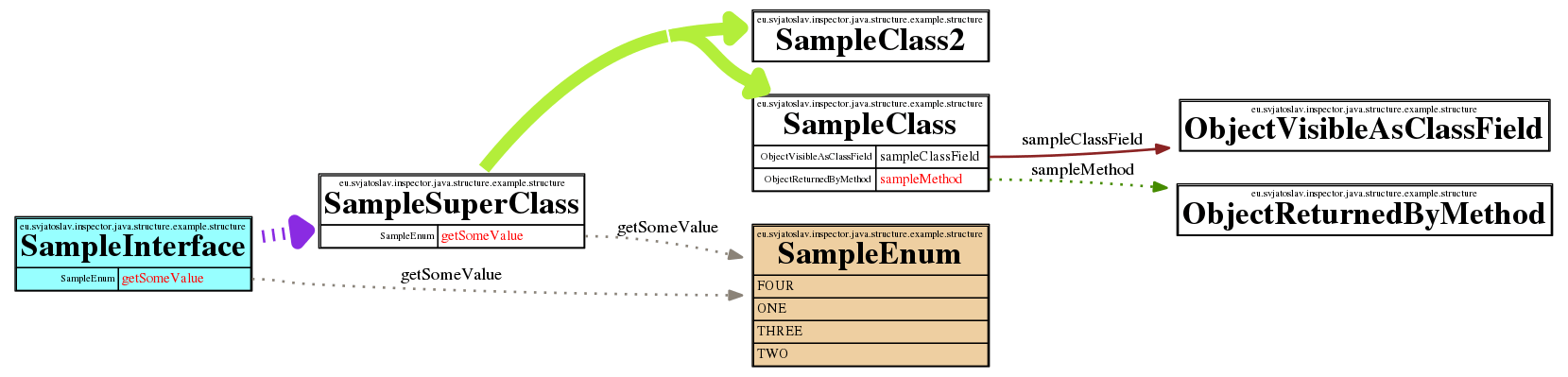
JavaInspect simplifies understanding source code by automatically visualizing program structure. See example graphs:
A very simple example:
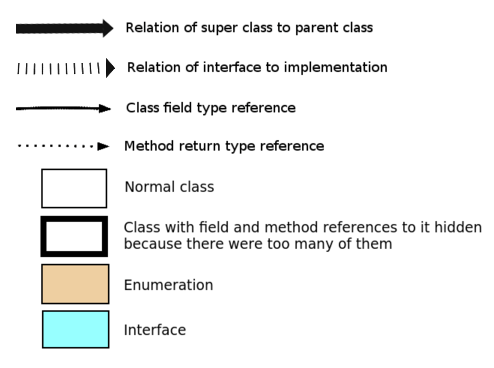
Graph legend:
JavaInspect can be used as a standalone commandline utility or as a Java library. It uses Java's built-in reflection to discover and visualize any part of a Java program.
After discovering application structure and optionally filtering out unimportant parts, JavaInspect produces a GraphViz DOT file describing the data to visualize. It then launches GraphViz to generate the graph image in PNG or SVG format.
1.1. See also
Similar or alternative solutions:
2. Usage
JavaInspect can be used in two ways:
3. Installation
GraphViz must be installed on your system.
On Ubuntu/Debian, install GraphViz using:
sudo apt-get install graphviz
To use JavaInspect via Java API, no further installation is needed. JavaInspect will be embedded into your project as dependency. This is described in usage via Java API. It will expect GraphViz to be available in the system.
To use JavaInspect as a commandline tool, JavaInspect source repository has to be cloned locally. See: Getting the source code.
Then study and execute installation script:
cd commandline\ launcher
./install
After installation, new commandline tool should be available
javainspect
Quick commandline usage help can be viewed by issuing
javainspect --help
4. Source code
This program is free software: released under Creative Commons Zero (CC0) license
Program author:
- Svjatoslav Agejenko
- Homepage: https://svjatoslav.eu
- Email: mailto://svjatoslav@svjatoslav.eu
- See also: Other software projects hosted at svjatoslav.eu
Getting the source code:
- Download latest source code snapshot in TAR GZ format
- Browse Git repository online
You can clone Git repository using git:
git clone https://www3.svjatoslav.eu/git/javainspect.git