Graphics demos
Table of Contents
- 1. Bump mapping
- 2. Tree
- 3. Rotation in 2D space using trigonometry functions
- 4. Various text mode animation effects
- 5. Snowfall
- 6. Screensaver
- 7. Screensaver - flying hand fans
- 8. Polygon rendering
- 9. Textured polygon rendering
- 10. Yin and yang animation
- 11. Orbiting particles
- 12. DNA animation
- 13. Matrix
- 14. Matrix - the opening scene
- 15. Hacker
- 16. Circular patterns
- 17. Sun, earth and moon
- 18. Maze
- 19. Fancy text mode animations
Back to BASIC applications collection
1. Bump mapping
This QBasic program demonstrates a classic bump mapping technique, creating an animation where a light source moves around a textured surface. The program visually simulates how different parts of the surface become illuminated based on the light source's position. This effect is commonly used in computer graphics to add depth and realism to surfaces without increasing geometric complexity.
The square on the left is the raw height map: random raised dots plus two diagonal ridges, drawn once in white. To its right the same surface is re-rendered every frame as a bump-mapped animation — the small red circle is the light source, whose position follows overlapping sine waves, and each pixel's brightness (grayscale palette entries 16-31) is derived from the distance to the light and the local slope of the height map. The bumps appear to swell and shade as the light wanders, until any key is pressed.
How It Works:
- Surface Generation : The program starts by generating a height map for the surface using random dots and lines. This height map defines the texture and contours of the surface.
- Light Animation : A light source is animated to move around the surface using sine functions, creating a smooth, circular motion.
- Brightness Calculation : For each pixel on the surface, the program calculates the brightness based on the distance and angle from the light source. This involves determining the surface inclination relative to the light position.
- Rendering : The surface is rendered with varying brightness levels to simulate the effect of the moving light source. The light source itself is drawn as a small circle that moves across the surface.
2. Tree
This QBasic program renders a fractal tree that starts with a single root and branches out into a complex pattern. The program is an artistic representation of how simple rules can generate intricate and beautiful structures, reminiscent of natural tree growth patterns.
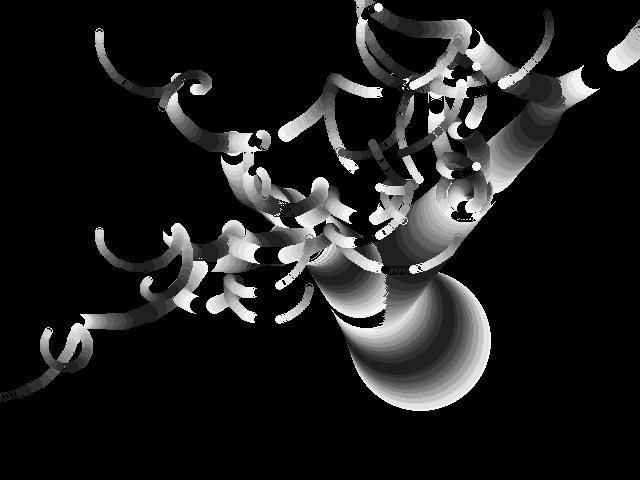
A finished grayscale fractal tree on a black background. A fat, bright trunk of overlapping filled circles near the lower right splits into ever thinner curling branches that taper into tiny hooks. The program starts from a single branch and doubles the population six times, giving each offspring a random drift; every branch is then drawn as a trail of filled circles whose radius decays slightly per step while the heading slowly turns. The custom 16-step grayscale palette makes thickness read as brightness, and the tint of each circle follows the branch angle.
DECLARE SUB setPalette ()
' Render tree that starts with single root and then branches out.
'
' This program is free software: released under Creative Commons Zero (CC0) license
' by Svjatoslav Agejenko.
' Email: svjatoslav@svjatoslav.eu
' Homepage: http://www.svjatoslav.eu
'
' Changelog:
' 2001, Initial version
' 2024.08, Improved program readability


DECLARE SUB start ()
DECLARE SUB show (d%)
DECLARE SUB setpal ()
DECLARE SUB showpal ()
DEFINT A-Y

DIM SHARED x(1 TO 500)
DIM SHARED y(1 TO 500)
DIM SHARED s(1 TO 500)

DIM SHARED x4(1 TO 500)
DIM SHARED y4(1 TO 500)

DIM SHARED z(1 TO 500)
DIM SHARED mitu


start

1
mitu = 1

x4(1) = -1
y4(1) = -1
x(1) = 420
y(1) = 340
s(1) = 70 * 100
z(1) = 1

' Main loop to render the tree branches
FOR tr = 1 TO 6
    FOR b = 1 TO 50
        FOR a = 1 TO mitu
            show a
        NEXT a
    NEXT b

    ' Duplicate existing branches and add randomness
    FOR a = 1 TO mitu
        x(mitu + a) = x(a)
        y(mitu + a) = y(a)
        s(mitu + a) = s(a)
        z(mitu + a) = z(a)
        x4(mitu + a) = RND * 4 - 2
        y4(mitu + a) = RND * 4 - 2
    NEXT a
    mitu = mitu * 2

NEXT tr

' Exit application if any key was pressed by user
IF INKEY$ <> "" THEN SYSTEM


SLEEP 2
CLS
GOTO 1

SUB setPalette
    ' Set the palette colors to grayscale
    FOR a = 0 TO 16
        OUT &H3C8, a
        OUT &H3C9, a * 4
        OUT &H3C9, a * 4
        OUT &H3C9, a * 4
    NEXT
END SUB

SUB show (d)
    ' Retrieve current branch properties
    x1 = x(d)
    y1 = y(d)
    s1 = s(d)
    z1 = z(d)

    ' Calculate color based on angle
    c = SIN(z1) * 7 + 9

    ' Draw and fill the circle representing the branch
    CIRCLE (x1, y1), s1 / 100, c
    PAINT (x1, y1), c

    ' Update position based on current angle and size
    x(d) = x(d) + (SIN(z1) * 1000) / (s1 + 15)
    y(d) = y(d) + (COS(z1) * 1000) / (s1 + 15)

    ' Decay the size slightly
    s(d) = s(d) / 1.01

    ' Update angle based on direction
    IF x4(d) >= 0 THEN z(d) = z(d) + .1 ELSE z(d) = z(d) - .1

    ' Move branch in its random direction
    x(d) = x(d) + x4(d)
    y(d) = y(d) + y4(d)
END SUB

SUB start
    SCREEN 12
    setPalette
    RANDOMIZE TIMER
END SUB
3. Rotation in 2D space using trigonometry functions
This QBasic program demonstrates the rotation of points in a 2D coordinate system using trigonometric functions. It simulates the rotation of a grid of points around the origin, providing a visual representation of how sine and cosine functions can be used to achieve 2D rotation.
A tilted square lattice of small white dots on a black background — a 21×21 grid of points caught mid-rotation. Each frame adds 0.01 radians to the angle, applies the sine/cosine rotation matrix to every grid point around the origin, scales the result by seven and centers it on screen, then redraws each point in white after erasing its previous position. The lattice keeps spinning smoothly until any key is pressed.
' This program showcases the rotation of points on an X-Y coordinate
' system using trigonometric functions, specifically sine and cosine. By
' simulating the effect of rotating a collection of grid points around
' the origin, it demonstrates the mathematical principles behind 2D
' rotation.
'
' This program is free software: released under Creative Commons Zero (CC0) license
' by Svjatoslav Agejenko.
' Email: svjatoslav@svjatoslav.eu
' Homepage: http://www.svjatoslav.eu

' Changelog:
' 2003.12, Initial version
' 2024, Improved program readability

DIM SHARED pointXCoordinates(1000) ' Array to store x coordinates of points
DIM SHARED pointYCoordinates(1000) ' Array to store y coordinates of points
DIM SHARED oldPointXCoordinates(1000) ' Array to store previous x coordinates of points
DIM SHARED oldPointYCoordinates(1000) ' Array to store previous y coordinates of points

SCREEN 13

numPoints = 0 ' Initialize the number of points
FOR pointXVal = -10 TO 10
    FOR pointYVal = -10 TO 10
        numPoints = numPoints + 1
        pointXCoordinates(numPoints) = pointXVal
        pointYCoordinates(numPoints) = pointYVal
    NEXT pointYVal
NEXT pointXVal

' Main rotation loop
rotationAngle = 0 ' Initialize the rotation angle to 0

1
    rotationAngle = rotationAngle + .01  ' Increment the rotation angle by 0.01 radians
    SOUND 0, .5

    ' Calculate the sine and cosine of the current rotation angle
    sineOfRotationAngle = SIN(rotationAngle)
    cosineOfRotationAngle = COS(rotationAngle)

    FOR pointIndex = 1 TO numPoints
        PSET (oldPointXCoordinates(pointIndex), oldPointYCoordinates(pointIndex)), 0 ' Clear the previous position

        xCoordinate = pointXCoordinates(pointIndex)
        yCoordinate = pointYCoordinates(pointIndex)

        ' Calculate the new x and y coordinate after rotation
        newXCoordinate = xCoordinate * sineOfRotationAngle + yCoordinate * cosineOfRotationAngle
        newYCoordinate = xCoordinate * cosineOfRotationAngle - yCoordinate * sineOfRotationAngle

        ' Scale and translate the new x and y coordinates to the center of the screen
        newXCoordinate = newXCoordinate * 7 + 160
        newYCoordinate = newYCoordinate * 7 + 100

        ' Store x and y on-screen coordinates for clearing on next iteration
        oldPointXCoordinates(pointIndex) = newXCoordinate
        oldPointYCoordinates(pointIndex) = newYCoordinate

        PSET (newXCoordinate, newYCoordinate), 15 ' Draw the point at the new position
    NEXT pointIndex

IF INKEY$ = "" THEN GOTO 1 ' Continue rotating if no key is pressed
4. Various text mode animation effects
This QBasic program creates visually appealing text mode animations by overlaying various graphical effects while scrolling its own source code in the background. It is an example of how to manipulate text and colors to create dynamic visual effects in a console environment.
Four effects are layered on a single 80×50 text screen. The source code of mkcircle.bas scrolls upward in dark red, a blue lattice of asterisks wraps around the screen along sine-driven paths, a wobbling circle filled with random multicolored characters pulses on the right, and horizontal and vertical lines of green '#' characters bounce between the edges, flashing brighter where they cross an asterisk. The whole composition keeps running until any key is pressed.
5. Snowfall
This QBasic program simulates a simple snowfall effect on the screen. It creates a visually appealing animation where particles (representing snowflakes) fall from the top of the screen to the bottom, interacting with obstacles and each other. The program is a example of basic animation and collision detection techniques, which can be educational for those interested in learning about simple physics simulations and graphical programming.
White snowflake pixels drift down a black sky and pile up on a giant wobbly cyan "SNOW" sign at the bottom of the screen. The program animates 500 particles, each falling one pixel per step with a small random sideways jitter; a POINT-based collision check detects when a flake lands on the sign, on a settled flake, or on the ground, at which moment it turns bright white and a fresh flake respawns at the top. The sign itself is built by printing "SNOW" in text mode and re-rendering each letter pixel as a wavy cyan block.
What's in it for the Reader?
- Learning Basic Animation
- This program provides a straightforward example of how to animate objects on the screen, which can be a foundational concept for game development and graphical applications.
- Collision Detection
- The code includes basic collision detection logic, which is essential for interactive applications and games.
- Randomization
- The use of randomness in particle movement and positioning can teach how unpredictability can be introduced into simulations.
- Graphics Handling
- The program demonstrates how to manipulate screen pixels and draw shapes, which is useful for understanding low-level graphics programming.
' Svjatoslav Agejenko 2003.04

DEFINT A-Z
DECLARE SUB fall (particleIndex)
DECLARE SUB start ()

amo = 500

DIM SHARED fx(1 TO amo)
DIM SHARED fy(1 TO amo)

' Initialize particle positions
FOR a = 1 TO amo
    fx(a) = RND * 300 + 10
    fy(a) = RND * 100 + 10
NEXT a

start

1
' Main loop to simulate snowfall
FOR b = 1 TO 100
    a = INT(RND * amo) + 1
    fall a
NEXT b
SOUND 0, .1
IF INKEY$ <> "" THEN SYSTEM
GOTO 1

SUB fall (particleIndex)

t = 0
2
' Draw the particle at its current position
PSET (fx(particleIndex), fy(particleIndex)), 0

ny = fy(particleIndex) + 1
nx = fx(particleIndex) + INT(RND * 3) - 1

' Check for collision with another particle
IF POINT(nx, ny) > 0 THEN
    ' If collision detected and t is less than 10, increment t and retry
    IF t < 10 THEN
        t = t + 1
        GOTO 2
    END IF
    ' If collision persists, change particle color to indicate collision
    PSET (fx(particleIndex), fy(particleIndex)), 15
    nx = RND * 300 + 10
    ny = 1
END IF

' Check if the particle has reached the bottom of the screen
IF fy(particleIndex) > 198 THEN
    PSET (fx(particleIndex), fy(particleIndex)), 15
    nx = RND * 300 + 10
    ny = 1
END IF

' Update particle position
fx(particleIndex) = nx
fy(particleIndex) = ny

' Draw the particle at its new position
PSET (fx(particleIndex), fy(particleIndex)), 15

END SUB

DEFSNG A-Z
SUB start
SCREEN 13

' Create nice and curvy surface for snow particles to fall onto.
' Here we draw "SNOW" with big and wobbly letters to the screen
' to serve as an obstacle for snow particles.

LOCATE 1, 1
PRINT "SNOW"

FOR y = 0 TO 15 STEP .2
    xp = SIN(y / 1) * 3 + 65
    FOR x = 0 TO 30 STEP .1
        ys = 4 + COS(x / 5)
        yp = COS(x / 4 + 3) * 5 + 130
        c = POINT(x, y)
        ' Draw a line if the point is not black
        IF c > 0 THEN
            LINE (x * 6 + xp, y * ys + yp)-(x * 6 + xp + 1, y * ys + yp + 1), 11, BF
        END IF
    NEXT x
NEXT y

LOCATE 1, 1
PRINT "      "

END SUB
6. Screensaver
The "Mystery Screensaver" is a visually captivating animation program written in QBasic. It creates an intriguing screensaver effect with dynamic, flowing lines that continuously change patterns, providing a mesmerizing visual experience. This program is an example of how simple mathematical functions can be used to create complex and engaging visual effects.
Hundreds of thin rainbow-colored straight lines weave an elliptical, eye-shaped string-art envelope on a black background. Each frame draws about 200 lines between two points that travel along sine and cosine curves at different speeds, so the envelope slowly morphs and rotates; the line color cycles through the palette, producing the rainbow gradient. Drawing happens on a hidden video page that is copied to the screen with PCOPY, keeping the motion flicker-free until any key is pressed.
' Mystery screensaver
' This program is free software: released under Creative Commons Zero (CC0) license
' by Svjatoslav Agejenko.
' Email: svjatoslav@svjatoslav.eu
' Homepage: http://www.svjatoslav.eu
'
' Changelog:
' 2004.01, Initial version
' 2024.08, Improved program readability

SCREEN 7, , , 1

' Main loop for animation
DO
    ' Increment frame counter
    frameCounter = frameCounter + 1

    ' Calculate scaling factor based on frame counter
    scaleFactor = (SIN(frameCounter / 100) + 1.1) * 2

    ' Draw lines to create animation effect
    FOR s = 1 TO 20 STEP .1
        ' Calculate x and y coordinates for the first point
        x = SIN(s / 1 + frameCounter / 7) * 100
        y = COS(s / 1 + frameCounter / 10) * 100

        ' Calculate x and y coordinates for the second point
        x1 = SIN(s / 1 - frameCounter / 8) * 100
        y1 = COS(s / 1 + frameCounter / 15) * 100

        ' Draw a line between the two points with varying thickness
        LINE (x + 160, y + 100)-(x1 + 160, y1 + 100), s MOD 15
    NEXT s

    ' Copy screen buffer to display the animation
    PCOPY 0, 1

    ' Generate a sound effect
    SOUND 0, 1

    ' Clear the screen for the next frame
    CLS

    ' Check if a key is pressed and exit if so
    IF INKEY$ <> "" THEN SYSTEM
LOOP
7. Screensaver - flying hand fans
This QBasic program is a visually engaging screensaver that creates an animated display of colorful lines and patterns. The program is designed to produce a dynamic and continuously evolving visual experience, reminiscent of classic screensavers from the early days of personal computing.
Ten fan-shaped bundles of straight lines drift and twirl on a black background, each fan radiating eleven spokes from a single moving anchor point. Every anchor glides along its own sine/cosine path while the spread and tilt of its spokes are modulated by further sine waves, making the fans open, close and sweep like folding hand fans. The VGA palette registers themselves are reprogrammed every frame, so the colors continuously glide through greens, blues, yellows and reds. Drawing is double-buffered with PCOPY; any key exits.
' Screensaver
'
' This program is free software: released under Creative Commons Zero (CC0) license
' by Svjatoslav Agejenko.
' Email: svjatoslav@svjatoslav.eu
' Homepage: http://www.svjatoslav.eu
'
' Changelog:
' 2003.04, Initial version
' 2024.08, Improved program readability


SCREEN 7, , , 1

' Main animation loop
1 :
    ' Adjust frame counter if it exceeds a certain threshold
    IF frameCounter > 10000 THEN frameCounter = -10000

    ' Update the positions of six points based on the frame counter
    FOR pointIndex = 1 TO 6
        OUT &H3C8, pointIndex
        OUT &H3C9, SIN(pointIndex + frameCounter * 3) * 30 + 31
        OUT &H3C9, COS(pointIndex * 1 + frameCounter * 5) * 30 + 31
        OUT &H3C9, SIN(pointIndex * .7 + frameCounter * 2.23) * 30 + 31
    NEXT pointIndex

    ' Increment the frame counter for the next iteration
    frameCounter = frameCounter + .01

    ' Render lines connecting points
    FOR objectIndex = 1 TO 10
        ' Determine the color based on the remainder of objectIndex divided by 6
        pointColor = (objectIndex MOD 6) + 1
        ' Calculate the X coordinate for the starting point of the line
        xCoordinate = SIN(objectIndex + frameCounter) * 100 + 150
        ' Calculate the Y coordinate for the starting point of the line
        yCoordinate = COS(objectIndex * 1.2 + frameCounter * 1.81) * 80 + 100
        ' Calculate the sine component for the line's angle
        xSineComponent = SIN(objectIndex * frameCounter * 2.3)
        ' Draw lines from the starting point with varying lengths and angles
        FOR xPositionOffset = -50 TO 50 STEP 10
            ' Calculate the cosine component for the line's angle based on xPositionOffset
            yCosineComponent = COS(xPositionOffset / 60 + frameCounter * 1 + objectIndex) * 50
            ' Draw a line segment with varying thickness and color
            LINE (xCoordinate, yCoordinate)-(xCoordinate + xPositionOffset * xSineComponent, yCoordinate - yCosineComponent), pointColor
        NEXT xPositionOffset
    NEXT objectIndex

    ' Copy the graphics from the hidden page to the visible page
    PCOPY 0, 1

    ' Clear the screen for the next frame
    CLS

    ' Play a sound at a specific frequency and duration
    SOUND 0, .4

    ' Check if any key is pressed; if so, exit the program
    IF INKEY$ <> "" THEN SYSTEM

    ' Loop back to the start of the animation
GOTO 1
8. Polygon rendering
This QBasic program generates and renders random polygons on the screen, each filled with a random color. It's a simple yet effective demonstration of basic computer graphics principles, particularly in rendering geometric shapes and handling randomness.
The screen is gradually papered over with overlapping flat-shaded triangles in vivid random colors — cyan, red, yellow, magenta and olive among them. Every iteration picks three random vertices and fills the triangle with a random palette color using a home-grown scanline filler: each edge is walked vertically while its x-coordinate is buffered per scanline, and horizontal spans are drawn between the stored and the current edge position. Triangles keep piling up at a steady pace until any key is pressed.
' Program to render polygons at random locations and random colors.
'
' This program is free software: released under Creative Commons Zero (CC0) license
' by Svjatoslav Agejenko.
' Email: svjatoslav@svjatoslav.eu
' Homepage: http://www.svjatoslav.eu

' Changelog:
' 2001,    Initial version
' 2024,    Improved program readability

DEFINT A-Z
DECLARE SUB fillPolygon (x1, y1, x2, y2, x3, y3, c)
SCREEN 13

MainLoop:
    ' Generate random coordinates for the first vertex
    x1 = RND * 318 + 1
    y1 = RND * 198 + 1

    ' Generate random coordinates for the second vertex
    x2 = RND * 318 + 1
    y2 = RND * 198 + 1

    ' Generate random coordinates for the third vertex
    x3 = RND * 318 + 1
    y3 = RND * 198 + 1

    ' Fill the polygon with a random color
    fillPolygon x1, y1, x2, y2, x3, y3, RND * 255

    ' Add delay
    SOUND 0, 1

    ' Check if any key is pressed to exit the loop
    IF INKEY$ <> "" THEN SYSTEM
GOTO MainLoop

SUB fillPolygon (x1, y1, x2, y2, x3, y3, c)
    ' Buffer array to store x-coordinates for each y-index
    DIM yBuffer(-10 TO 210)

    ' Draw the line between the first and second vertices
    tempX1 = x1
    tempY1 = y1
    tempX2 = x2
    tempY2 = y2
    GOSUB makeLine

    ' Draw the line between the first and third vertices
    tempX1 = x1
    tempY1 = y1
    tempX2 = x3
    tempY2 = y3
    GOSUB makeLine

    ' Draw the line between the second and third vertices
    tempX1 = x3
    tempY1 = y3
    tempX2 = x2
    tempY2 = y2
    GOSUB makeLine

GOTO FillEnd

makeLine:
    ' Ensure that the start point is always below the end point
    IF tempY2 < tempY1 THEN SWAP tempY1, tempY2: SWAP tempX1, tempX2

    ' Loop through each y-index from the start to the end
    FOR yIndex = tempY1 TO tempY2 - 1
        ' Calculate the x-position for the current y-index
        xPos = tempX1 + (tempX2 - tempX1) * ((yIndex - tempY1) / (tempY2 - tempY1))

        ' If the buffer is empty, store the x-position
        IF yBuffer(yIndex) = 0 THEN
            yBuffer(yIndex) = xPos
        ELSE
            ' Otherwise, draw a line between the stored and calculated positions
            LINE (xPos, yIndex)-(yBuffer(yIndex), yIndex), c
        END IF
    NEXT yIndex
RETURN

FillEnd:
END SUB
9. Textured polygon rendering
The program provides a practical example of texture mapping, a fundamental concept in computer graphics. Readers can learn how textures are applied to polygons.
A spirograph-like ring of triangles swept around the screen center: the rotating demo draws one textured triangle per step, and because the screen is never cleared between frames the traces accumulate into a toothed wheel. Each triangle is filled not with a flat color but with a sample texture of random colored circles prepared at startup, stretched and sheared differently in every triangle. The mapper works scanline by scanline — polygon edges are walked while texture coordinates are interpolated alongside, then horizontal spans copy pixels straight out of the texture image. Earlier frames of the screencast show a single textured triangle jumping to random positions; later ones keep the triangle fixed and rotate the texture coordinates instead.
10. Yin and yang animation
Yin and yang is a concept that originated in Chinese philosophy, describing an opposite but interconnected, self-perpetuating cycle. Yin and yang can be thought of as complementary and at the same time opposing forces that interact to form a dynamic system in which the whole is greater than the assembled parts and the parts are important for cohesion of the whole.
The classic yin-yang symbol on a deep blue background, slowly rotating. The symbol is composed from just two circles orbiting the center in opposite phase, each drawn as a stack of concentric rings: the outer half of the stack takes one color and the inner half the opposite, so as the two circles sweep over the screen the interlocking teardrop shapes emerge. One circle is black-on-white, the other white-on-black, and the angle advances by 0.05 radians per frame until any key is pressed.
' Yin and yang animation.
'
' This program is free software: released under Creative Commons Zero (CC0) license
' by Svjatoslav Agejenko.
' Email: svjatoslav@svjatoslav.eu
' Homepage: http://www.svjatoslav.eu
'
' Changelog:
' 2000, Initial version
' 2024.08, Improved program readability

DECLARE SUB Cir (x!, y!, r!, c!)
SCREEN 13
pi = 3.141592599999999#
PAINT (1, 1), 1

' Main animation loop
DO
    ' Calculate the x and y positions for both circles using sine and cosine functions
    x = SIN(a) * 40 + 160
    x1 = SIN(a + pi) * 40 + 160
    y = COS(a) * 34 + 100
    y1 = COS(a + pi) * 34 + 100

    ' Draw the first circle with color 0 (black)
    Cir x, y, 40, 0
    ' Draw the second circle with color 1 (blue)
    Cir x1, y1, 40, 1

    ' Increment the angle to animate the circles
    a = a + .05

    ' Check for user input to exit the program
    IF INKEY$ <> "" THEN SYSTEM

    ' delay to slow down animation
    SOUND 0, 1
LOOP

' Subroutine to draw a circle with specified center (x, y), radius r, and color c
SUB Cir (x, y, r, c)
    ' Define colors for the circle outline
    cc1 = 0 ' Black
    cc2 = 15 ' White

    ' Swap colors if the second color is desired for the inner part of the circle
    IF c = 1 THEN SWAP cc1, cc2

    ' Draw the circle from radius 1 to r
    FOR a = 1 TO r
        ' Determine the color for the current circle segment
        IF a < r / 2 THEN c1 = cc1 ELSE c1 = cc2
        ' Draw the circle segment with the determined color
        CIRCLE (x, y), a, c1
    NEXT a
END SUB
11. Orbiting particles
This QBasic program creates a visually engaging animation of particles orbiting around a central point. The particles are rendered as colored circles, each moving in a unique orbit, creating a dynamic and mesmerizing effect.
A starburst of colored filled circles on a black background, each tethered to the screen center by a thin line of the same color. Fifty particles with random colors, radii and phases orbit the middle: the horizontal position follows the sine of the particle's angle while the circle's radius is scaled by the cosine of that same angle, so a particle swells as it swings toward the viewer and shrinks as it recedes — a cheap pseudo-3D orbit effect. Every angle advances by 0.1 per frame and the animation runs until any key is pressed.
' Projects animated particles in orbit around a central point.
' This program is free software: released under Creative Commons Zero (CC0) license
' by Svjatoslav Agejenko.
' Email: svjatoslav@svjatoslav.eu
' Homepage: http://www.svjatoslav.eu

' Changelog:
' ?, Initial version
' 2024, Improved program readability

SCREEN 7, , , 1
RANDOMIZE TIMER

' Declare shared arrays to store particles
DIM SHARED particleColor(1 TO 100)
DIM SHARED particleX(1 TO 100)
DIM SHARED particleAngle(1 TO 100)

' Initialize the arrays with random values
FOR a = 1 TO 100
    particleColor(a) = RND * 15
    particleX(a) = RND * 100
    particleAngle(a) = RND * 100
NEXT a

' Main loop to draw the animated particles
1
CLS
FOR a = 1 TO 50
    ' Get current segment data
    currentColor = particleColor(a)
    currentParticleX = particleX(a)
    currentparticleAngle = particleAngle(a)

    ' Calculate the x and y coordinates for the current segment
    xCoordinate = SIN(currentparticleAngle) * 25
    yCoordinate = SIN(currentParticleX) * 20

    ' Scale the coordinates
    scaleFactor = (COS(currentparticleAngle) + 2) * 2
    xCoordinate = xCoordinate * scaleFactor
    yCoordinate = yCoordinate * scaleFactor

    ' Draw the current particle as a circle
    CIRCLE (xCoordinate + 160, yCoordinate + 100), scaleFactor, currentColor

    ' Fill the inside of the circle with color
    PAINT (xCoordinate + 160, yCoordinate + 100), currentColor

    ' Draw a line from the center to the current particle
    LINE (160, 100)-(xCoordinate + 160, yCoordinate + 100), currentColor

    ' Rotate particle by small amount for next frame
    particleAngle(a) = particleAngle(a) + .1
NEXT a

' Copy screen buffer 0 to screen buffer 1
PCOPY 0, 1

' Check for user input and exit if any key is pressed
IF INKEY$ <> "" THEN SYSTEM

' Use sound function with inaudible 0 Hz but fixed delay to slow down animation
SOUND 0, 1

' Go back to the main loop
GOTO 1
12. DNA animation
Animated DNA. Nowhere close to being anatomically correct, but resembles animation as seen in the movies :)
A cartoon DNA double helix on a black background: two intertwining strands of cyan and red spheres twist down the screen, cross-linked by white horizontal rungs. Each frame places twenty points per strand along phase-shifted sine waves and rotates the pair by 0.1 radians; a pseudo-depth value picks both the sphere's radius and the order in which it is drawn, so closer spheres appear larger and overlap the distant ones, faking 3D. The frame is assembled on a hidden video page and flipped on screen with PCOPY; the helix keeps spinning until any key is pressed.
' Program to render animated DNA as seen in the movies.
'
' This program is free software: released under Creative Commons Zero (CC0) license
' by Svjatoslav Agejenko.
' Email: svjatoslav@svjatoslav.eu
' Homepage: http://www.svjatoslav.eu
'
' Changelog:
' ?, Initial version
' 2024, Improved program readability

DIM SHARED xCoordinates(1 TO 100)
DIM SHARED yCoordinates(1 TO 100)
DIM SHARED zCoordinates(1 TO 100)
DIM SHARED colorCodes(1 TO 100)

SCREEN 7, , , 1

1:
SOUND 0, .5

b = 0
rotationAngle = rotationAngle + 0.1
FOR a = 1 TO 20
    b = b + 1
    ' Calculate x-coordinate using sine function and add to array
    xCoordinates(b) = SIN(a / 2 + rotationAngle) * 30 + 150
    ' Calculate z-coordinate using sine function and add to array
    zCoordinates(b) = SIN(a / 2 + rotationAngle + 1.6) * 2 + 2
    ' Calculate y-coordinate by multiplying a with 8 and adding z-coordinate
    yCoordinates(b) = a * 8 + zCoordinates(b)
    ' Assign color code to the current point
    colorCodes(b) = 3

    b = b + 1
    ' Calculate x-coordinate using sine function and add to array
    xCoordinates(b) = SIN(a / 2 + rotationAngle + 2.5) * 30 + 150
    ' Calculate z-coordinate using sine function and add to array
    zCoordinates(b) = SIN(a / 2 + rotationAngle + 1.6 + 2.5) * 2 + 2
    ' Calculate y-coordinate by multiplying a with 8 and adding z-coordinate
    yCoordinates(b) = a * 8 + zCoordinates(b)
    ' Assign color code to the current point
    colorCodes(b) = 4
NEXT a

' Clear the screen
CLS

' Draw lines and circles based on z-coordinate
FOR b = 0 TO 4
    IF b = 1 THEN
        FOR a = 1 TO 40 STEP 2
            ' Draw line between consecutive points
            LINE (xCoordinates(a), yCoordinates(a))-(xCoordinates(a + 1), yCoordinates(a + 1)), 15
        NEXT a
    END IF

    FOR a = 1 TO 40
        ' Check if the current z-coordinate matches the loop variable b
        IF int(zCoordinates(a)) = b THEN
            ' Draw circle with specified color code
            CIRCLE (xCoordinates(a), yCoordinates(a)), b + 5, colorCodes(a)
            PAINT (xCoordinates(a), yCoordinates(a)), colorCodes(a)
            ' Draw an black outline of the circle
            CIRCLE (xCoordinates(a), yCoordinates(a)), b + 5, 0
        END IF
    NEXT a
NEXT b

' Copy the screen to buffer and clear the screen
PCOPY 0, 1
CLS

' Check if any key is pressed
IF INKEY$ = "" THEN GOTO 1

' End the program
SYSTEM
13. Matrix
Effect inspired by "The Matrix" movie.
Green angular glyphs rain down a black screen in vertical streams, each stream head glowing bright while the trail behind fades through darker greens. The glyphs are nine home-drawn rune shapes that the program renders with LINE, anti-aliases with a recursive pixel-smoothing pass and captures into sprite arrays with GET; eight streams then walk down a 19×14 grid, and every cell ages through three pre-rendered brightness variants before being erased. The frame rate is throttled with a TIMER busy-wait; any key exits.
14. Matrix - the opening scene
Animation inspired by the opening scene from "The Matrix" movie: the phone-call trace sequence. A line of digits is gradually decoded at the top of the screen while random numbers cascade along the bottom, accompanied by a high-pitch pulsing sound. Messages such as "Are you sure the line is clear?" appear as the decoding progresses.
A green-on-black terminal re-enacting the phone-trace scene: at the top a number is decoded digit by digit — "11 4867" has been revealed so far — next to the taunting message "Are you sure the line is clear?", while the rest of the screen fills with endlessly cascading random digits. Every hundred frames one more digit of the code is locked into a random position and the remaining length shortens; the message changes as the trace progresses, and once it has fully played out the program exits. The cascade itself is just one fresh line of random digits printed each frame at the bottom of a scrolling viewport, accompanied by a pulsing high-pitch tone.
15. Hacker
Ultra-realistic hacker screen simulator! Behold da glory of a true hacker's terminal, brimming wif mystical green text that cascades like a waterfall of knowledge across thy monitor.
A 40×25 wall of green alphanumeric gibberish scrolls downward in several intensities of green, with single characters mutating as they go — the essence of every movie hacking scene. Each frame shifts the whole character buffer down one row and wraps the top row around to the bottom, then cycles through eight actions: replacing random characters, painting horizontal and vertical streaks in brighter greens, letting colors decay one step, resetting every other row or column, and peppering random cells with color. A custom five-shade green palette is programmed straight into the VGA palette registers, and a rotating sound array produces the clicking beeps. The animation runs until any key is pressed.
16. Circular patterns
This QBasic program generates a fractal animation that looks like atoms. While it uses a simple formula to calculate the color of every pixel, sin((x² + y²) / 10) * 6 + 23, the visual effect is quite impressive. The formula was accidentally discovered. Frame by frame the zoom factor decreases, creating a continuous zooming effect into the circular pattern.
A black-and-white field of concentric rings radiating from several bright "atom" centers, their ripples interfering into moiré fringes. The whole picture comes from a single formula evaluated per pixel — sin((x² + y²) / 10) * 6 + 23, clamped to palette entries 16-31 — with x and y measured in a coordinate window that shrinks every frame as the zoom factor is divided by 1.1. The result is a continuous dive into the circular interference pattern, and the program stops on its own once the zoom factor drops below 5.
17. Sun, earth and moon
This QBasic program projects an animation of the sun, earth and moon. The moon orbits the earth, and the earth orbits the sun. The program uses clever trickery to determine the drawing order of the objects based on their y-coordinates, instead of doing proper Z-sorting.
A big red sun sits left of center on a black background while a small blue earth circles it, an even smaller yellow moon in tow. The earth follows a flattened elliptical orbit driven by sine and cosine of a slowly advancing angle, and both its size and the moon's scale with the y-coordinate to fake perspective — bodies nearer the bottom of the screen are drawn larger. Instead of real Z-sorting the program simply checks whether the earth is below or above the sun's center line (and likewise moon versus earth) to pick the drawing order, so the bodies correctly pass in front of and behind each other.
18. Maze
This QBasic program renders an animated 3D maze. The maze grows one segment at a time along a randomly picked axis, each segment colored randomly, while the viewer position and rotation angles are driven by sine functions. Points are rotated around two axes and projected with perspective division, and only line segments in front of the viewer are drawn.
Colored wireframe segments streak across a black void — an early frame of a 3D maze that grows one segment per frame. Each step extends the path along a randomly chosen axis by a random amount and gives the new segment a random color, while the camera position and both rotation angles drift on sine waves. Every point is rotated around two axes, projected with perspective division, and any segment with an endpoint behind the viewer is skipped entirely. Frames are drawn on a hidden video page and flipped with PCOPY; the program stops by itself after 1200 frames.
19. Fancy text mode animations
This QBasic program renders fancy looking text mode animations in an 80x50 text screen. Various effects are overlaid on top of each other while the program scrolls its own source code in the background: a wrapping pattern of asterisks driven by sine functions, a wobbling circle filled with random characters and colors, and vertical and horizontal lines bouncing between the screen edges.
An 80×50 text screen layered with several effects at once: the program's own source code scrolls upward in dark red, a woven blue lattice of asterisks crawls across the screen along sine-driven paths, and horizontal plus vertical lines of green '#' characters bounce between the screen edges, glowing brighter where they cross an asterisk. A wobbling circle filled with random multicolored characters periodically swells into view on top of it all. Each frame is composed in an off-screen buffer and printed in a single pass; any key exits.