3D Synthezier
Table of Contents
Back to BASIC applications collection
1. Operating principle
Parses scene definition language and creates 3D world based on it. Result will be in a wavefront obj file, witch can be then visualized using external renderer.
Basic concept of defining scene is:
- Simple and primitive objects are created on point and polygon level.
- More complex ones can be created my combinig already existing ones, while applying various transformations on them.
Objects with all its subobjects can be rotated, mirrored or resized omong any axis. Generator has built in cache for data input and output to minimize file access.
Generated scenes are versioned alongside the source, so the cities can be downloaded and imported directly - no generator run needed:
| file | contents |
|---|---|
| city1.obj | rectangular city (~28k faces) |
| city2.obj | hexagonal city (~211k faces) |
| result.mtl | shared material library |
They are plain wavefront obj files and import into Blender or any other renderer as-is.
1.1. Rectangular city
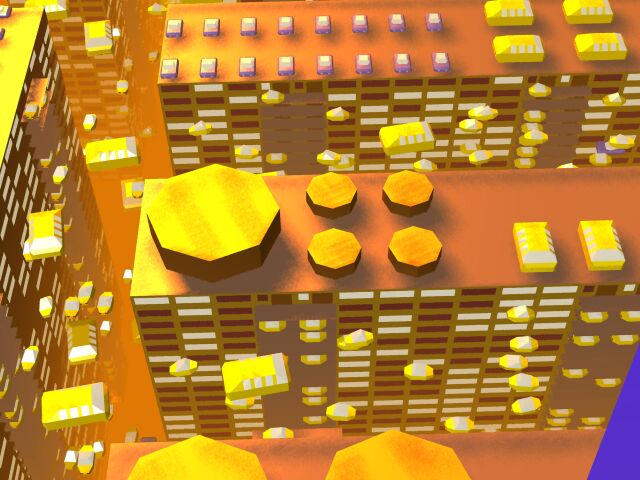
The rectangular city at night under its single light source: four square towers with lit facades facing the light and gray shadow sides facing away. The city1.3d script places four building objects (three of them rotated with xz90) plus rows of cars parked at various heights. Each building is 32 stacked storey_square floors crowned by a randomly picked roof variant (roof, roof2 or roof3).

A close aerial view of a roof-parking variant: the flat stone slab carries buses and police cars (bus and police sub-objects) next to a tilted solar panel and pipes. Facades are assembled from window_big and window_small panels - wall_brick quads with recessed glass. On large flat surfaces like this roof the per-texel GI lightmap grid is visible up close.
1.2. Hexagonal city
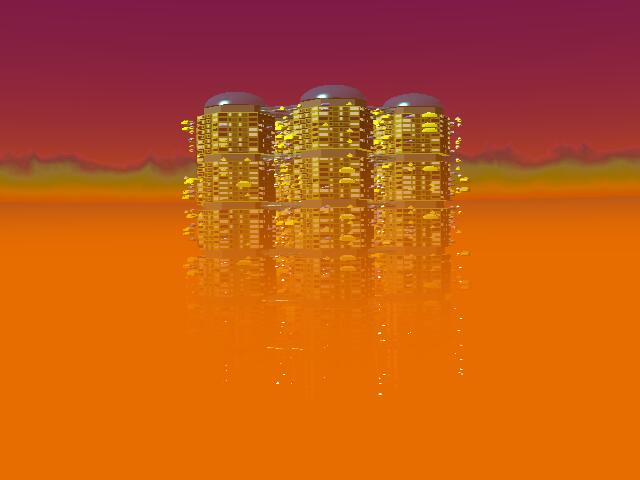
A distant view of the hexagonal city at dusk: a cluster of hexagonal towers crowned with translucent domes rises from a low-poly plain under an orange sky. The city2.3d script builds this by stacking block sub-objects and placing stone ring and glass dome (dome) objects at hexagon vertex offsets - multiples of sin and cos of 30 degrees - scaled twentyfold with the x*20 z*20 size modifiers.
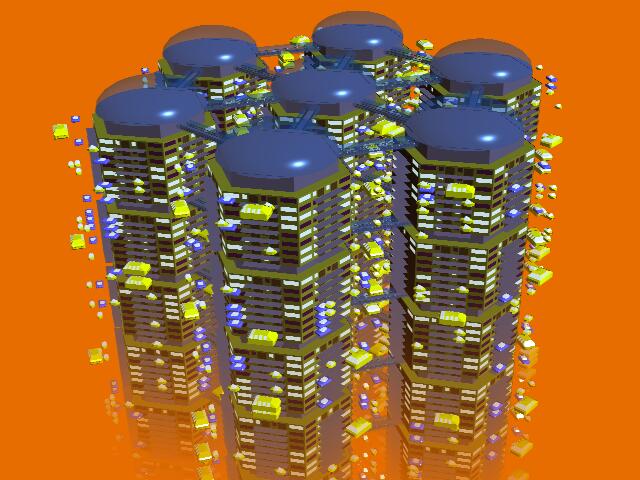
A closer aerial look at the hexagonal tower cluster, showing the blue-tinted glass domes sitting on their stone rings with roads threading between the towers. Each dome and ring is a separate sub-object pulled from the include directory and positioned by the use command, while materials are switched between stone (stone) and glass_transp with mtl commands before each placement.
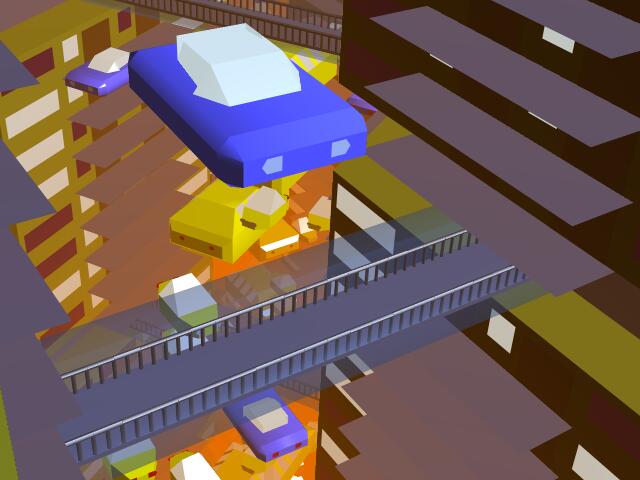
Street-level view inside the hexagonal city: low-poly cars in blue, yellow and red dot the roads between the towers. The vehicles are the same car sub-objects reused dozens of times with different x, z and y offsets and xz rotations, illustrating how the language composes complex scenes from a handful of cached primitive objects.
2. Scene description language
A scene is a plain text file with one command per line. The parser reads a line, splits it into words (spaces or tabs), substitutes variables, and executes the first word as a command. Two kinds of files play different roles:
- scene file (bin/city1.3d, bin/city2.3d) - the entry point given on the command line. Opens the output file with out, then instantiates objects with use.
- object files (include/*.3d) - reusable building blocks: walls, windows, cars, buildings. They define raw geometry with p, origin, f and mtl, and can instantiate further objects themselves.
The rectangular and hexagonal cities above were described entirely in this language; the source scripts are bin/city1.3d and bin/city2.3d.
Command summary (each has a full section below):
| command | purpose |
|---|---|
| out | open the output .obj file (first command) |
| origin | set the origin that face indices count from |
| p | define a vertex |
| f | define a triangle or quad face |
| mtl | select the material for following faces |
| use | instantiate a sub-object, with transforms |
| pickmtl | select one material at random |
| pick | execute one alternative at random |
| dum | no-op placeholder used to weight pick odds |
| set | set a variable |
| %n | substitute a variable into any line |
| ifeq | compare two words, set a condition flag |
| if | execute a command only when its flag is set |
| # | comment line |
The old spellings here, obj, rnd, mtlrnd, cmp and ?<slot> remain
valid aliases, so scenes written before the rename keep working unchanged.
| warn | print a warning and wait for a keypress |
| end | flush output and terminate immediately |
2.1. A minimal scene
Everything about the geometry commands fits into one tiny example.
An object file tent.3d (reusable, so it starts with origin and
has no out or end):
# A tent: floor, two roof slopes, two triangular ends.
origin

# ground rectangle
p 0 0 0
p 4 0 0
p 4 0 6
p 0 0 6

# ridge line
p 2 3 0
p 2 3 6

mtl stone
f 0 1 2 3
f 0 1 4
f 3 2 5

mtl roof
f 0 4 5 3
f 1 2 5 4
A scene file street.3d that stamps out three copies of it with
different transforms (the ~ prefix loads from the program
directory instead of the include path):
# Three tents in a row: same object, different transforms.
out street
use ~tent
use ~tent x+8 z+2
use ~tent x+16 y*1.5
Running crtbasic 3dparse.bas --headless --command=street (DOS:
qb /RUN 3dparse.bas /CMD street) produces this exact
street.obj, unedited:
mtllib result.mtl
v  0  0  0
v  4  0  0
v  4  0 -6
v  0  0 -6
v  2  3  0
v  2  3 -6
v  8  0 -2
v  12  0 -2
v  12  0 -8
v  8  0 -8
v  10  3 -2
v  10  3 -8
v  16  0  0
v  20  0  0
v  20  0 -6
v  16  0 -6
v  18 4.5  0
v  18 4.5 -6
usemtl stone
f  1 4 3 2
f  1 5 2
f  4 6 3
f  7 10 9 8
f  7 11 8
f  10 12 9
f  13 16 15 14
f  13 17 14
f  16 18 15
usemtl roof
f  1 4 6 5
f  2 5 6 3
f  7 10 12 11
f  8 11 12 9
f  13 16 18 17
f  14 17 18 15
Reading it line by line teaches most of the format:
- 18 vertices = 3 instances x 6. Instance 2 is offset by x+8 z+2,
instance 3 by x+16, and its
y*1.5scale stretched the ridge from y=3 to y=4.5. - Z is negated on output: tent z=6 becomes -6 in the OBJ. The scene language and Wavefront OBJ disagree on handedness; the parser flips Z while writing.
- Faces come out with their vertex order reversed: source
f 0 1 2 3is written asf 1 4 3 2. Flipping Z is a mirror, and reversing the face restores source-space winding (see f). - Faces are not grouped by tent. All stone faces (floors and ends of all three tents) come first, then all roof slopes: output is grouped by material, because faces are buffered per material.
- Indices run from 1 to 18 continuously across instances - OBJ
numbers vertices from 1, while
flines in the source count from the most recent origin starting at 0. - The first line references
result.mtl, the shared material library that must sit beside the .obj file.
2.2. out
out file
Opens file.obj for writing and emits the mtllib result.mtl
header line. Use it exactly once, as the first command of the scene
file, before any geometry: every vertex and face written afterwards
goes to this file. All output is buffered, so the file only grows in
blocks while the scene executes (see Parser internals).
Both city scripts begin with it:
# small city block
out city1

use building xz90
...
2.3. origin
origin
Records the number of vertices defined so far. From then on, f indices count from that point starting at 0.
This is the trick that makes objects reusable: an object file starts
with origin, so its faces only ever reference its own vertices,
no matter where in the scene the instance lands. The parser adds the
recorded offset (and OBJ's 1-based numbering) when writing, so the
same source line f 0 1 2 3 becomes f 1 4 3 2 in the first tent
and f 7 10 9 8 in the second.
A scene-level file that only composes objects (like city1.3d) never
needs origin - only files that define raw faces do.
Legacy spelling: here - the parser accepts both.
2.4. p
p x y z
Defines one vertex. Before the coordinates are stored, every
transform on the active use stack is applied to them, so a
p inside an included object lands wherever the instance was moved,
rotated or scaled to.
- Coordinates are numbers: integers, negatives and decimals all work
(
p 0.5 -0.5 -0.01appears in window_big.3d). - Words may be separated by spaces or tabs; several include files use tabs.
- Vertices are numbered in definition order across the whole run
and stream into the OBJ as
vlines in that same order, with Z negated. - Buffer: 1000 vertices are held in memory, flushed in definition order whenever the buffer passes 900 entries. Flushing changes nothing about indices.
2.5. f
f p1 p2 p3 p4
Defines one face - a triangle when p4 is omitted, a quad when it
is present. Indices count from the most recent origin, starting
at 0; in the OBJ they appear absolute and 1-based.
- Winding is not preserved verbatim: vertex output negates Z (a
mirror), so faces are emitted in reversed order to keep the
source-space orientation intact. Net effect: author faces so that
the right-handed normal
cross(v2-v1, v3-v1)points out of the solid, and that is what the OBJ will contain. - Instances placed with a negative scale (e.g.
x*-1) are mirrored; the parser tracks the parity of negative scales on the transform stack and flips winding back automatically. Odd count of negative scales = mirrored = winding flipped once more. - Faces are buffered per current material (100 entries), then
written as a run behind a single
usemtlline. This is why OBJ output is grouped by material rather than by object. - Indices may reach back past the current object - they are just
offsets into the global vertex list. prism4.3d uses this together
with if to optionally cap a prism:
if 0 f 0 1 2 3.
2.6. mtl
mtl material
Selects the material that following f faces are stored under. The first use of a name appends it to the material table (up to 50 materials); using it again later just re-selects it.
Materials are only names at this stage - their colors and textures
live in the shared result.mtl library that the OBJ references on
its first line. A name missing from result.mtl still ends up in the
output; the renderer will complain about it, not the generator.
Real usage from city2.3d, switching between stone and glass before each placement:
mtl stone
use ring x*20 z*20 y+26
mtl glass_transp
use dome x*20 z*20 y*10 y+26
2.7. use
use object xz45 xy20 x+3 y*2
Instantiates another .3d file: its lines are executed right there,
as if typed in place (then the instance picks up its transforms).
Legacy spelling: obj - the parser accepts both.
inside the current context. Objects instantiate further objects
freely - city1.3d calls building, which calls storey_square (a floor) thirty
times, which calls wall_square / wall_hex (walls), which call window_big /
window_small (windows).
2.7.1. Where the file is found
A plain name loads <include path>/<object>.3d (the include
directory). A name prefixed with ~ loads <object>.3d from the
program directory instead - that is how the scene files themselves
are pulled in: the launcher effectively runs use ~city1.
Loaded files are kept in a 10-file cache, so the 30 floors of a building cost one disk read, not thirty (see Parser internals).
2.7.2. Transforms
Every argument after the file name is a transform applied to each vertex the object (and its nested objects) defines:
| op | effect |
|---|---|
xz<deg> |
rotate in the X-Z plane (+X toward +Z) |
yz<deg> |
rotate in the Y-Z plane (+Y toward +Z) |
xy<deg> |
rotate in the X-Y plane, mirrored (+X toward +Y) |
x+ / y+ / z+ |
translate along an axis |
x- / y- / z- |
subtract along an axis |
x* / y* / z* |
scale one coordinate |
Angles are in degrees, may be negative (xz-90), and translations
and scales accept decimals (x+55.9809 in city2.3d). The arguments
are pushed onto a stack - they apply to each vertex in their written
order, innermost object first, enclosing objects after:
Typical lines from bin/city1.3d - rotate a building upright and move it over, or park cars at several altitudes:
use building xz90 x+48
use cars x+26 z-25 y-10
Two measured quirks of the rotation math, both part of the file format by now:
- The X-Y rotation is mirrored: its matrix has determinant -1, so
xyreflects while it rotates (that is also where the "mirrored" in the overview comes from). The bundled scenes were built around this behavior, so it is documented rather than fixed. - The degrees-to-radians factor uses pi = 3.141285, so
cos(90)leaves a visible 0.00154 residue in rotated coordinates. Harmless for rendering, but it means the value must never be "corrected" - the generated geometry depends on it.
2.7.3. A correction to older documentation
This page previously described a trailing ~ suffix that would
read an object directly from disk, bypassing the cache to allow
files larger than 500 lines. The parser has no such mode - only the
leading ~ (program directory) exists. Every object goes through
the same cache and the same 500-line limit per file.
2.8. pickmtl
pickmtl material ...
Selects one of the listed materials at random - each listed name has
the same chance, so repeating a name weights it
(pickmtl a a b picks a two thirds of the time).
Legacy spelling: mtlrnd - the parser accepts both.
Used for variety without extra scripting. Every window block in the cities picks its glass tone per instance (window_big.3d / window_small.3d):
pickmtl glass_light glass_dark
That one line is why some windows render as light glass and others
as dark glass across the towers. The dice are seeded from the clock
(RANDOMIZE TIMER), so every generator run produces a slightly
different city.
2.9. pick
pick command1 command2 ...
Executes exactly one of the alternatives, chosen uniformly at
random. Because spaces separate words, a caret ^ stands in for a
space inside an alternative: use^car^xz91 executes as
use car xz91.
From include/wall_hex.3d - a wall randomly gets a police car, a plain car, a bus, or (most often) nothing at all, thanks to dum padding:
pick use^police^xz-92^z-6^x+1 dum dum dum dum
pick use^car^xz91^z-10^x+5 dum dum dum dum
pick use^car^xz87^z-8^x+19 dum dum dum dum
pick use^bus^xz-90^z-12^x+10 dum dum dum dum dum dum dum dum
The first three lines each give a 1/5 chance of a vehicle, the bus a mere 1/9. include/cars.3d uses the same trick at 1/2 to sometimes swap a car for a police car. Like pickmtl, the choice is seeded from the clock.
2.10. dum
dum
Does nothing - and that is the point. Any word that matches no
command is silently ignored, so an unrecognized word like dum is a
legal, harmless line. Its one real use is padding the odds inside
pick lists: each dum is one more chance that nothing
happens. It is a convention, not a command - banana would work
exactly the same.
2.11. set
set variable contents
Stores contents in variable variable. Variables are numbered
0-100 (101 slots) and hold a single word.
Variables are global: once set, every line executed afterwards - in any file, at any nesting depth - sees the value, until something overwrites it. Callers use this to parameterize the objects they instantiate; include/hexcluster.3d configures the hexagonal prism it is about to include:
set 1 stone
set 2 0
use prism6 x*20 y*5 z*20 y+21
Here variable 1 picks the body material and variable 2 tells prism6 whether to generate end caps (see ifeq and if).
2.12. variables usage
anycommand %1 anything
Before a line executes, every word of the form %n is replaced
textually with the contents of variable n. It works in any
position of any command - material names, coordinates, transform
operands:
mtl %1
use prism6 x*20 y*5 z*20 y+21
Since set values are single words, a substitution always yields exactly one word.
2.13. ifeq
ifeq flag string1 string2
Compares the two words (after % substitution) and
sets condition flag flag when they are equal, clears it otherwise.
There are 10 flags, numbered 0-9.
Flags are stored per nesting depth: each level of use nesting owns
a fresh row of 10, so a sub-object's flags cannot clash with its
caller's. Everything executing at the same depth shares that level's
row.
2.14. if
if flag anycommand
Executes anycommand only when condition flag flag (a single
digit, 0-9) is set at the current nesting depth; otherwise the line
is skipped entirely.
The complete mechanism, from include/prism4.3d - the end caps of the prism exist only when the caller set variable 2 to 1:
ifeq 0 %2 1
if 0 f 0 1 2 3
if 0 f 4 5 6 7
2.15. #
# whatever text
Comment. Lines whose first character is # are skipped while the
file is loaded, as are blank and whitespace-only lines - they never
reach the parser or count against the 500-line cache limit.
2.16. warn
warn message
Prints the word after warn in bright red and waits for a keypress.
A debugging aid from the DOS days for flagging suspicious scenes;
only the first word of the message is shown. Not used by the city
scripts.
2.17. end
end
Flushes all buffered output (like a normal end of file), prints "terminated from file" and exits the whole program immediately.
Rarely needed: falling off the end of the scene file flushes and
exits anyway. Never put end in an object file - it would kill
the entire run the first time that object was instantiated, leaving
a half-written city.
2.18. Parser internals
A few implementation facts that explain both the performance and the shape of the output.
2.18.1. Command cache
Object files are parsed once and their command lines kept in a 10-slot cache, evicted least-recently-used first. A 30-story building re-reads nothing: the floor, wall and window files stay resident while hundreds of instances execute from memory. While the generator runs, the screen shows this very table - the ten slots with file names, line counts and stamps - plus parsed / cache-miss counters.
2.18.2. Output buffers
Vertices (1000 slots) and faces (100 slots per material) accumulate in memory and flush in blocks. Absolute vertex numbering makes the flushes invisible in the result - but the per-material face buffers are exactly why the OBJ groups faces by material rather than by object.
2.18.3. Limits
| resource | limit |
|---|---|
| vertex buffer | 1000 (flushes past 900) |
| face buffer per material | 100 (flushes past 90) |
| materials | 50 |
| cached files | 10 |
| stored lines per cached file | 500 (comments/blanks free) |
| transform stack depth | 500 |
| use nesting depth | 50 (flag rows) |
| variables | 101 (%0 - %100) |
| condition flags | 10 per depth (0 - 9) |
3. Installation
The only requirement is crtbasic, the QBasic-dialect
interpreter that runs bin/3dparse.bas. No include-path editing is
needed: the parser resolves the relative ..\include\ path against
the bin directory.
3.1. System requirements
| software | notes |
|---|---|
| crtbasic | runs the generator (tested on Linux) |
The include files use long descriptive names (window_big.3d,
hexcluster_bridges.3d, …) that exceed the DOS 8.3 filename
limit, so the project is no longer DOS/QBasic compatible - and no
attempt is made to keep it so.
3.2. Directory layout
- bin
- 3dparse.bas
- 3D generator main executable
- city1.3d
- city with square-like buildings
- city2.3d
- city with hexangular buildings
- result.mtl
- shared material library
- city1.obj, city2.obj
- generated cities (versioned)
- *.sh
- quick launch scripts (crtbasic)
- include
- 3D objects used to compose the scene
4. Usage
Run the generator through crtbasic:
bin/city1.sh
or
bin/city2.sh
which executes
crtbasic 3dparse.bas --headless --command=city1
where --command fills COMMAND$ (the DOS /CMD switch). After
parsing, the generated city1.obj / city2.obj appear in the bin
directory. Visualize the scene with your favourite renderer - or use
the versioned OBJ files directly without regenerating.